SetupSelect

Gaming Setup buying framework

How to choose lighting and cable management

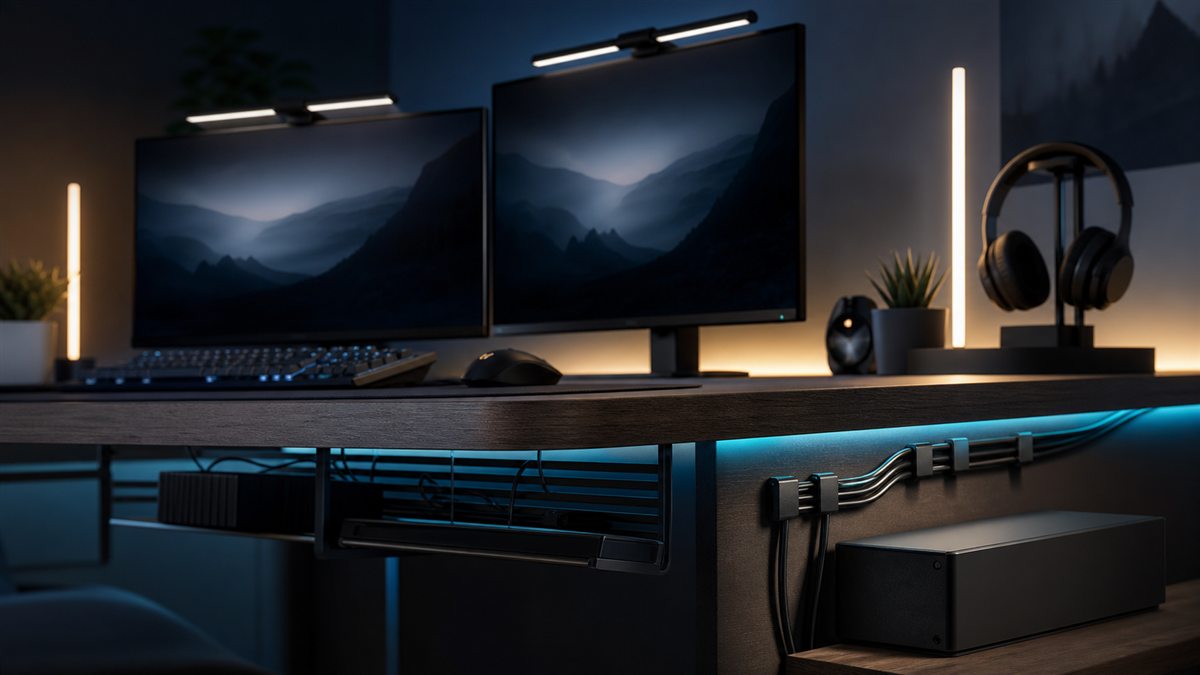
Make the setup safe and maintainable before adding effects. Separate room, task, bias and camera lighting by purpose, and keep power and signal routes accessible enough to troubleshoot.

Fit before features

Three checks to do first

  1. 1Draw every power, display, USB, network and charging route.
  2. 2Check screen reflections and camera exposure from the normal position.
  3. 3Measure desk edges, moving parts, cable length, adapter space and ventilation.

Decision framework

What should drive the decision?

Lighting purpose

Room light supports safe use, task light supports controls, bias light softens screen contrast and face light serves a camera.

Cable movement

Height-adjustable desks, chairs and removable controllers need controlled slack rather than tightly fixed routes.

Control and maintenance

App, hub and account dependencies can outlast the novelty. Prefer settings that remain useful when software is unavailable.

The trade-off to understand

Hidden installations look polished but can trap heat and complicate changes. Freestanding and reusable routes are easier to move but remain more visible.

Warning signs in a listing

  • Extension leads are daisy-chained or adapters are enclosed without ventilation.
  • Adhesive mounts carry heavy power bricks above equipment.
  • Lighting requires permanent cloud access for basic on, off or brightness control.

A sensible buying order

  1. 1Make power and minimum lighting safe.
  2. 2Test the complete gaming setup.
  3. 3Route fixed and removable cables separately.
  4. 4Add bias, camera or decorative lighting for a defined task.

Use the framework with your setup

Record the measurements and non-negotiables above before comparing individual models. These related tools help turn the framework into a practical shortlist.

Common questions

Before you compare products

What should I check first when buying gaming lighting and cable?

Draw every power, display, USB, network and charging route.

Is it worth paying more for gaming lighting and cable?

Only when the additional spend improves a requirement you will use regularly. Hidden installations look polished but can trap heat and complicate changes. Freestanding and reusable routes are easier to move but remain more visible.

Current catalogue

Compare lighting and cable management

Use the framework above to decide which differences matter. Then verify the exact model, specification, seller, current price, availability, delivery and returns on Amazon.

Styled lighting and cable management selection
Editorial catalogue score, not personalised Fit: 84
BenQ ScreenBar Pro Monitor Light

BenQ / mid range

Editorial research only · not hands-on tested

Check the exact model, seller, availability and delivery terms on Amazon before buying.

gaming setupmid rangetask light

Key features

  • Mounts above the screen to preserve desk space
  • Directed task light can reduce room glare

Trade-off: Monitor-top fit must be checked

View on Amazon

Paid link. As an Amazon Associate I earn from qualifying purchases. Details

Compare products
Styled lighting and cable management selection
Editorial catalogue score, not personalised Fit: 84
Govee Gaming Light Bars

Govee / mid range

Editorial research only · not hands-on tested

Check the exact model, seller, availability and delivery terms on Amazon before buying.

gaming setupmid rangeappearance

Key features

  • Freestanding bars allow flexible placement
  • Scene-based lighting creates visible atmosphere

Trade-off: Adds power and cable requirements

View on Amazon

Paid link. As an Amazon Associate I earn from qualifying purchases. Details

Compare products
Styled lighting and cable management selection
Editorial catalogue score, not personalised Fit: 84
Elgato Key Light Neo

Elgato / mid range

Editorial research only · not hands-on tested

Check the exact model, seller, availability and delivery terms on Amazon before buying.

gaming setupmid rangestreaming

Key features

  • Small monitor-mounted format preserves desk space
  • Designed for camera-facing illumination

Trade-off: Monitor fit and webcam position need checking

View on Amazon

Paid link. As an Amazon Associate I earn from qualifying purchases. Details

Compare products
Styled lighting and cable management selection
Editorial catalogue score, not personalised Fit: 77
D-Line Cable Tidy Box

D-Line / budget

Editorial research only · not hands-on tested

Check the exact model, seller, availability and delivery terms on Amazon before buying.

gaming setupbudgetcable management

Key features

  • Contains loose power-strip clutter
  • No wall installation required

Trade-off: Needs ventilation and suitable plug clearance

View on Amazon

Paid link. As an Amazon Associate I earn from qualifying purchases. Details

Compare products
Styled lighting and cable management selection
Editorial catalogue score, not personalised Fit: 77
SOULWIT 50-Piece Adjustable Cable Clip Set

SOULWIT / budget

Editorial research only · not hands-on tested

Check the exact model, seller, availability and delivery terms on Amazon before buying.

gaming setupbudgetcable management

Key features

  • Fifty-piece adjustable clip listing
  • Adhesive clips can separate several cable runs

Trade-off: Adhesive may mark or fail on some surfaces

View on Amazon

Paid link. As an Amazon Associate I earn from qualifying purchases. Details

Compare products
Styled lighting and cable management selection
Editorial catalogue score, not personalised Fit: 77
Govee RGBIC LED Strip Lights

Govee / budget

Editorial research only · not hands-on tested

Check the exact model, seller, availability and delivery terms on Amazon before buying.

gaming setupbudgetappearance

Key features

  • Flexible ambient-light route
  • Segmented colour effects on compatible variants

Trade-off: Adhesive installation needs a clean compatible surface

View on Amazon

Paid link. As an Amazon Associate I earn from qualifying purchases. Details

Compare products