Buying guide
Carry-on tech kit for a laptop and phone: charger, cables and battery
A useful carry-on tech kit contains the charger, cables, adapters and battery that actually support your devices and journey. Start with the laptop and phone requirements, decide what must charge at the same time, then check the complete connection chain.
A pouch full of spare connectors is not necessarily more reliable than a smaller kit that has been verified before departure.
This guide uses hypothetical device loads and packing weights to explain the process. It does not recommend an unnamed charger, certify electrical compatibility or guarantee airline acceptance.
Check the exact equipment labels, employer requirements and current official travel rules for your route.
Make a device inventory
List the laptop, phone, headset, watch, camera and any work-specific device that will travel. Record the connector, normal charging method and manufacturer input requirements for each.
Distinguish devices that must be ready quickly from those that can charge overnight or on alternate days.
Keep work-device restrictions visible. A managed laptop may require an approved charger, dock or security accessory. Do not replace it with an unapproved travel alternative merely because the connector fits.
Confirm the permitted arrangement with the employer where relevant.
Then remove devices that duplicate a function without a clear need. A tablet may be useful for a presentation or reading, but it adds its own charger, case and weight. The aim is not minimalism at any cost; it is a kit in which each item has a defined role.
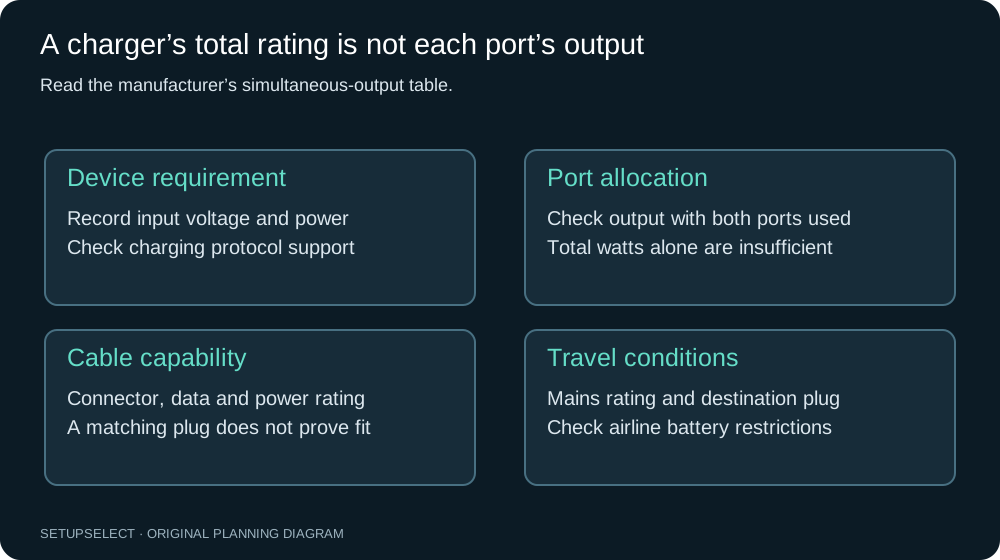
Read the output combinations, not just total watts
A multi-port charger may advertise a total power figure while allocating different amounts when several ports are used. Read the manufacturer's simultaneous-output table.
Check the protocols and voltage/current combinations required by the laptop and phone, not just the largest number printed on the packaging.
For a hypothetical laptop requiring a 65W charging arrangement and a phone using 20W, the simultaneous requirement is 85W if both are to receive those inputs together.
A charger labelled 100W might support a suitable split, but it might distribute power differently. The label alone does not establish the answer.
You may not need maximum simultaneous charging. If the phone can charge later, a simpler arrangement may meet the itinerary. Decide that deliberately and test the sequence.
Do not assume a low-power combination will keep a laptop charged during heavy use merely because the battery icon indicates a connection.
Three charging scenarios
In a hotel-only scenario, the laptop and phone can charge at different times overnight. A verified single-device charger plus a suitable phone connection may be adequate, provided the schedule and available outlets support it.
Include the possibility that a socket is inconveniently placed or switched with room lighting.
In a conference scenario, both devices may need a short simultaneous top-up between sessions. Here the output split matters more. Record the actual supported combination and test it with both devices connected, using their normal cables.
Watch for power renegotiation or interruptions when a second device is added.
In a long-travel scenario, a compliant power bank may provide useful reserve for a phone or other supported device. Laptop charging from a battery requires additional compatibility and capacity checks.
Do not infer that a power bank with USB-C can power any laptop or that its stored energy will provide a promised number of full charges.
| Scenario | Main requirement | What to verify |
|---|---|---|
| Overnight sequential charging | Reliable charging over available time | Device support, outlets and schedule |
| Short simultaneous top-up | Suitable power split across ports | Actual output table and cable capability |
| Charging during travel | Compatible portable reserve | Device output support and current carriage rules |
Cable capability and length
Two cables with the same connector shape may support different power and data functions. Use cables rated and approved for the intended device and output.
If a cable is required for both charging and an external display or data transfer, verify those functions separately.
Choose length around the likely use rather than making every cable as short as possible. A very short lead is tidy inside a pouch but may not reach from a hotel socket to a stable surface.
A longer cable adds bulk, so consider one practical general-purpose length and shorter leads only where their role is clear.
Label cables whose capability is otherwise difficult to distinguish. Test the exact cable with the exact charger and device before departure. A successful test with a different lead does not verify the travel kit that is actually packed.
Plug adapters and voltage are separate
A travel adapter changes the physical plug connection and should not be assumed to convert voltage. Check each device's input label and the destination supply requirements. The adapter's rating and supported use must also suit the equipment connected to it.
Do not use a generic universal adapter as evidence that every electrical appliance is compatible. High-power appliances and specialist equipment can have different requirements from a laptop charger.
If the label or instructions are unclear, ask the manufacturer or obtain qualified advice instead of improvising.
For multi-country trips, record each destination and the actual adapters required. One compact adapter may be convenient, but a single shared item can also become a bottleneck for several travellers.
Choose redundancy according to the work and itinerary rather than automatically packing one of everything.
Power-bank energy and airline checks
Power-bank capacity is often marketed in milliamp-hours, while carriage rules and energy comparisons use watt-hours. Where the required voltage is known and appropriate, watt-hours can be calculated as amp-hours multiplied by volts.
Use the manufacturer's marked energy rating where available rather than guessing the voltage from the USB output.
For example, 10,000mAh is 10Ah. At an explicitly stated cell voltage of 3.7V, the stored-energy calculation is 37Wh. That is an arithmetic example, not an approval for a particular battery or a promise of delivered energy.
Conversion losses and operating conditions reduce what reaches a device.
Check the current CAA Pack Right guidance and the operating airline's rules for the exact journey, including quantity, approval and use restrictions.
Keep required batteries in the appropriate baggage and protect terminals as instructed. Do not assume a previously accepted battery remains acceptable on every route or airline.
Prepare for a gate-checked bag
A cabin bag may sometimes be taken for carriage in the hold. Organise the kit so items that must remain with you can be removed promptly in accordance with the airline's instructions.
Do not bury batteries or essential documents beneath tightly packed clothing.
Use a small accessible pouch where practical, but do not assume every item in it has the same carriage rules. Installed batteries, spare batteries and other electronics can be treated differently.
Follow current official guidance and the crew's instructions rather than relying on a general packing slogan.
Keep critical work devices protected and consider what is needed for the first meeting if the main bag is delayed. This is a practical contingency plan, not a reason to carry prohibited equipment or disregard an airline's limits.
A transparent weight example
The table below is a hypothetical planning budget for a charger, cables, adapter, battery and pouch. It is not a weighed product comparison. Replace each figure with the mass of your actual item, including any protective case or attached cable.
| Component | Example mass |
|---|---|
| Charger | 180g |
| Two required cables | 90g |
| Destination adapter | 70g |
| Power bank, if needed and permitted | 220g |
| Pouch | 60g |
| Example total | 620g |
Removing the hypothetical power bank reduces this example to 400g, but only makes sense if portable power is unnecessary. Replacing the charger with a heavier model could still be worthwhile if it replaces another required device.
Evaluate the complete kit, not each item in isolation.
The carry-on planner helps add this to the bag's total. Remember the empty bag, laptop sleeve and other accessories. A tech kit can consume a meaningful share of a small allowance even when every individual item feels light.
Pack for protection and access
Keep connectors from being crushed and avoid sharply bending cables at their ends. Follow the equipment's storage instructions and inspect for damage before travel.
A pouch should organise the kit without forcing components into a compressed shape that strains leads or plugs.
Separate liquids from electronics and keep frequently needed items accessible.
If the airport requires a device to be presented or powered on, be prepared according to current guidance. GOV.UK's electronic-device guidance explains relevant UK screening considerations; requirements can differ elsewhere.
Do not charge equipment inside an unsuitable enclosed pouch or under clothing. Use a stable arrangement consistent with the manufacturer's ventilation and safety instructions. A compact travel setup still needs appropriate operating conditions.
Test the complete kit before leaving
Connect the laptop and phone using the exact charger, ports and cables you will pack. Test the simultaneous arrangement if that is part of the plan.
Check whether adding or removing one device changes the output to another, and confirm that the laptop behaves as expected during representative use.
Test the destination adapter mechanically with the charger without assuming that a physical fit proves electrical suitability. Check the input labels and supported use separately.
Do not perform unsafe mains experiments or use damaged or uncertain equipment to complete a trial.
Then pack the kit and retrieve each item in the order expected during travel. Confirm that labels remain visible and that the pouch closes without pressure on connectors.
A successful electrical compatibility check and a practical packing check solve different problems; both are useful.
Build sensible redundancy
A spare cable for a critical device can be a reasonable low-weight contingency if it is verified and clearly identified. Carrying several unknown cables is less useful.
For essential work, confirm how replacement or support would be obtained at the destination rather than relying entirely on a large bag of backups.
Consider whether one charger is a single point of failure for every device. The appropriate response depends on trip length, work importance and available support.
A second charger may be justified, but it should have a defined role and fit the power and packing plan.
Do not share work-device credentials or bypass security controls to make a backup arrangement function. Follow employer policies for accessories, data and remote support.
A travel kit should reduce friction without creating a separate information-security problem.
Common mistakes
The first mistake is assuming total charger wattage applies independently to every port. The second is treating a travel adapter as a voltage converter.
Another is comparing power banks only by milliamp-hours while ignoring marked watt-hours, output capability and current airline conditions.
It is also easy to pack the right charger with the wrong cable, or to choose leads so short that the kit cannot be used at the destination. Keep the exact tested combination together.
Replace damaged or unreliable components before adding optional organisers, stands or decorative accessories.
Label the kit by function
Two visually similar cables may serve different jobs. Label the cable needed for the laptop's normal charging requirement and identify any cable that is only suitable for lower-power devices.
Keep the labels modest and readable so they survive being handled during a trip.
Test the complete kit at home using the intended simultaneous connections. Check the manufacturer's output-sharing table before the trial and watch for ordinary signs that the device is not charging as expected.
A successful short connection is not a full electrical safety test or proof of every charging mode.
Finally, keep a simple inventory inside the pouch or in your notes. The return-trip check should count the charger, adapters, cables and security keys, not merely confirm that the pouch itself is still in the bag.
Questions and final checklist
Can one charger handle a laptop and phone? Sometimes.
Verify the simultaneous output combination, supported protocols and cables for the actual devices. Does a larger power bank guarantee more laptop runtime? No; stored energy, output compatibility, conversion losses and the workload all matter.
Should every business traveller carry a power bank? No. It is useful when the itinerary creates a real charging gap and the item is permitted. Does a USB-C connector prove compatibility? No; connector shape is only one part of the evidence.
- List device requirements and simultaneous charging needs.
- Verify the charger output table and exact cables.
- Check destination plug and voltage compatibility.
- Confirm current battery carriage and use rules with official sources.
- Weigh and test the complete packed kit.
- Keep critical items accessible and follow employer requirements.
Use the travel-power planner, battery checker and business packing list as research and planning aids.
Manufacturer documentation and current carrier guidance take precedence over illustrative calculations. SetupSelect has not personally tested a named charger or battery for this article.
Continue researching