Buying guide
Small-desk cable management without drilling
Good cable management on a small desk keeps power accessible, allows equipment to move and makes it easy to disconnect one device without dismantling everything. Hiding every wire is not the goal.
A practical no-drill arrangement usually starts with fewer cables, a clear route for permanent connections and separate access for the devices you move regularly.
This guide uses an illustrative fixed-desk layout and a standing-desk variation. It does not certify an electrical installation or claim hands-on testing of particular clips, trays or adhesives.
Follow the equipment instructions, preserve ventilation and have electrical work handled by an appropriately qualified person when needed.
Inventory the connections before buying organisers
Write down every device and each cable's two endpoints. Separate mains power, low-voltage charging, video, network and audio connections. Note whether the device stays on the desk, moves during work or leaves the desk each day.
A laptop charger used for travel should not be buried in the same permanent bundle as a monitor's power lead.
Record the power supplies as objects, not just their cables. Their size, ventilation requirements and plug orientation affect tray choice. A row of bulky adapters can obstruct neighbouring sockets even when a power strip has enough outlets on paper.
Measure the intended arrangement with the actual plugs inserted.
Then remove unnecessary duplicates. A verified multi-port charger or dock may simplify the system, but only if it supports the devices' required power and functions.
Replacing several working cables with an incompatible all-in-one solution is not a useful improvement. Check the complete setup before buying cosmetic sleeves.
Draw three routes
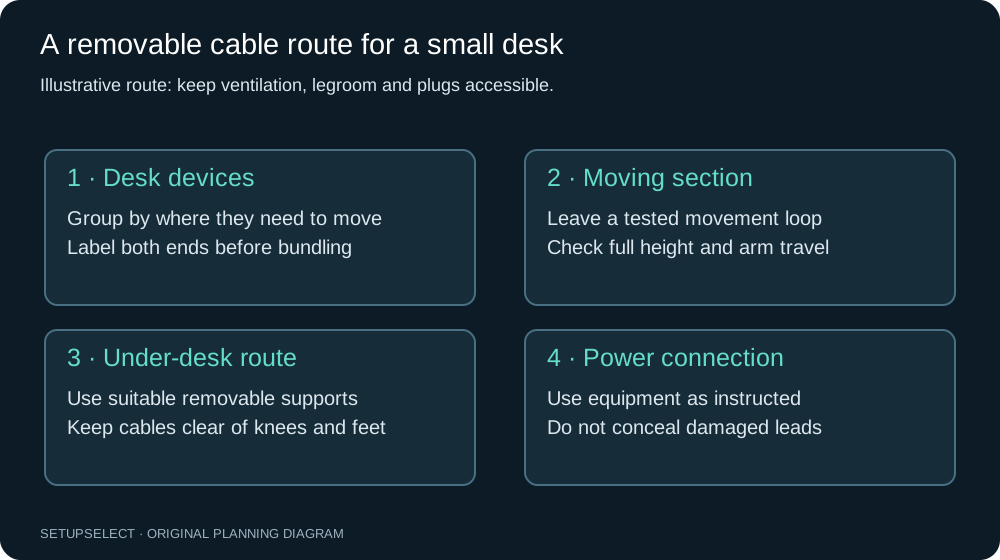
Divide the plan into a fixed power route, an equipment route and an accessible charging route. The fixed route connects the wall supply and the stationary desk equipment. The equipment route follows monitors or arms that move occasionally.
The charging route serves phones, headsets and a laptop that may be removed often.
On a small desk, these routes may share part of their path, but they should remain serviceable. Use reusable ties at sensible intervals rather than a single tight bundle around every cable.
Leave labels near endpoints so you can identify a lead without tracing it through the entire desk.
Choose a power-strip location for access
An underside tray or suitable mount can keep connections away from feet and cleaning equipment, but it should remain reachable. Check the power strip's instructions, mounting method and ventilation needs.
Do not assume any strip can be fixed upside down or enclosed because another product is designed for that use.
Avoid placing connections where spills, chair wheels or moving desk parts can reach them. Keep the switch accessible without requiring you to pull the desk away from the wall.
A hidden switch that cannot be reached quickly is a poor trade for a cleaner photograph.
Do not overload outlets or use a sequence of extension leads to overcome an unsuitable location. The number of sockets is not a measure of available electrical capacity.
Check the rated equipment and the manufacturer's instructions, and obtain qualified advice if the proposed arrangement is unclear.
No-drill fixing options and their limits
Clamp-on trays avoid screw holes but require suitable edge geometry, thickness and underside clearance. A frame rail, bevelled edge or shallow overhang can prevent a clamp seating properly.
Verify the supported desktop material and load, and do not assume glass or hollow-core surfaces accept the same clamps as solid timber.
Adhesive clips can organise light cables, but surface preparation, finish, temperature and load affect their performance. A claim of removable adhesive does not guarantee damage-free removal from every veneer, paint or laminate.
Test an inconspicuous area where appropriate and follow the adhesive manufacturer's installation and removal instructions.
Reusable straps attached to an existing suitable frame can be useful if they do not obstruct adjustment or ventilation.
Avoid improvised fixings that compress mains cables, sharp cable ties against delicate leads, or an arrangement in which a cable carries the weight of a power supply.
| Option | Useful when | Verify before using |
|---|---|---|
| Clamp-on tray | Suitable edge and underside access exist | Clamp range, desktop material, load and frame clearance |
| Adhesive clips | Routing light, mostly stationary leads | Surface compatibility, preparation and removal method |
| Reusable ties | Grouping cables that may change | No compression, sharp bends or connector tension |
| Freestanding organiser | Permanent fixing is unsuitable | Stability, access, heat and cleaning clearance |
Fixed-desk worked example
Imagine a 120 × 60cm desk with one monitor, a laptop dock, keyboard, mouse and a phone charger. Place the monitor and input devices first.
Route the monitor power and video cables towards the rear service zone, keeping the dock where its frequently used ports can be reached without lifting the screen.
Keep the phone lead separate from the permanent bundle so it can be replaced or taken away. Measure its required reach from the actual charging position, not the shortest straight line to the power strip.
A little accessible slack is useful; a long loop across the mouse area is not.
Mount or place power supplies only after checking their size and ventilation instructions. The cable route should support the leads independently of their connectors. Finally, unplug each device once.
If removing the laptop charger requires cutting ties around the monitor cable, the grouping is too permanent for the way the desk is used.
Standing-desk worked example
A standing desk moves while the wall outlet remains fixed. Measure the complete route at the lowest and highest intended positions, including the path around the frame.
The necessary cable length is not simply the difference between those two desktop heights; the entry and exit points and bend route also matter.
Use a supported service loop or an appropriate moving cable-management system, following its instructions. Keep the loop away from feet, chair wheels and pinch points.
A cable should not become taut before the desk reaches its intended height, and excess slack at the low position should not fall into the mechanism.
Test the full movement with all real equipment connected and with nobody's hands near moving parts. Watch power supplies, monitor arms and any cables shared with stationary furniture. Stop if something snags or tensions.
Do not rely on a desk's collision feature as a substitute for a correctly planned cable route.
Monitor arms need their own movement allowance
A monitor arm changes the distance and angle between the screen connections and the desk. Route cables through the intended clips without pulling them tight at one convenient position.
Check extension, rotation, tilt and height changes that you will actually use, within the arm's supported range.
The cable must accommodate the motion without forcing the display connector or preventing the arm from moving naturally. Conversely, excess slack should not catch the clamp or another device.
Check the arm instructions for routing and for any restrictions on cable thickness or connector size.
The monitor-arm compatibility guide addresses the mounting side of the problem. Cable management does not compensate for an unsuitable arm or desktop.
Resolve those compatibility questions before concealing the installation beneath covers or sleeves.
Label for maintenance, not just installation
Use short labels that identify the device or purpose at both ends of an otherwise ambiguous cable. A label saying “monitor video” is more useful than a decorative colour system nobody remembers.
Keep labels away from heat sources and moving joints, and use materials appropriate for the cable and environment.
Record any connection that depends on a specific port or cable capability. A cable that looks identical to another may support different charging or display functions.
If a work setup relies on one verified connection chain, labelling helps prevent a later tidy-up from introducing a hard-to-find fault.
Keep a simple photograph or sketch of the final route for your own maintenance. That is not a substitute for manufacturer instructions, but it can make it easier to restore the arrangement after cleaning or moving.
Update it when a device or power supply changes.
Ventilation and heat
Power supplies and docks can generate heat. Do not place them in a sealed decorative box merely because the cables become invisible.
Check the intended ventilation and spacing for the actual equipment, and avoid covering vents with fabric sleeves or piling adapters against one another.
An open tray may be more serviceable than a closed box, but openness alone does not establish safe placement. Consider dust, spills, cable strain and access.
A tray mounted directly beneath an adjustment mechanism can still create a mechanical hazard even if airflow is good.
If equipment becomes unusually hot, smells abnormal or has damaged cables, stop using it and follow the manufacturer's advice. A cable-management project should not conceal damaged or unreliable hardware.
Replace or have it assessed appropriately before building a permanent route around it.
Keep the daily connections easy
Identify the devices that leave the desk: laptop, phone, headset or camera. Give those leads a reachable parking position so they do not fall behind the desk when unplugged.
Clips should hold the cable without crushing it and should not force a sharp bend near the connector.
If the laptop disconnects daily, a suitable dock can reduce repeated handling, but verify charging, display and peripheral support. A dock that still requires several additional leads may not simplify the setup as much as expected.
Test the normal arrival and departure routine before fixing everything in place.
For shared desks, use labels or a short connection note that another user can follow. Avoid a system that only works because one person remembers which apparently identical cable must go into which port.
Practical organisation survives ordinary use by someone other than its designer.
A sensible small-desk parts list
Start with the existing safe, compatible power and connection hardware. Add a small number of reusable ties, labels and suitable light-duty routing clips. Only buy a tray, sleeve or dock when the inventory shows a specific need.
This keeps the project from becoming a collection of organisers that take more room than the original cables.
Measure the tray with the actual adapters, allowing access to plugs and switches. Check whether connectors can pass through any cable opening before committing to a closed channel.
A sleeve that cannot open along its length may make later changes much harder than a wraparound design.
If the desk is rented, shared or likely to move, prioritise reversible methods and retain the original components. “No drilling” is only one aspect of reversibility; adhesive damage and clamp marks can also matter.
Document the finish and follow the furniture owner's requirements where relevant.
Final test before calling it finished
- Move the desk and arms through every intended position.
- Check that no cable is pulled tight, pinched or supporting a device's weight.
- Unplug each frequently moved device without disturbing unrelated connections.
- Reach the power switch and inspect the plugs without dismantling the desk.
- Clean the surface and floor around the setup.
- Check ventilation, spill exposure and the chair's complete movement route.
If any test fails, change the route rather than hiding it with another sleeve. A good system remains understandable when a device stops working or a cable needs replacing.
The aim is a workstation that is easy to use and maintain, not an installation that can only be admired from one angle.
Questions and sources
Should every cable be hidden? No. Visible, accessible leads can be the better choice for equipment that moves or disconnects frequently. Concealment should not compromise inspection, ventilation or movement.
Are adhesive clips renter-safe? There is no universal guarantee. The adhesive, finish, preparation and removal method all matter. Follow the relevant instructions and obtain permission where required rather than relying on a broad marketing label.
Can one sleeve hold all the cables? It may be physically possible, but can make servicing and movement difficult. Group by route and behaviour, preserving access to devices that change often. Do not use a sleeve to force incompatible paths together.
For the wider workstation context, see the HSE home-working guidance. Electrical and mounting requirements come from the exact equipment instructions, not the illustrative layout here.
Use the workspace fit planner to check the furniture arrangement and the laptop setup guide to establish equipment positions before finalising cable routes.
Continue researching