Buying guide
Small home office under £300: three itemised setup plans
A useful home office under £300 starts by reusing what already works and spending on the constraint that makes daily work difficult.
There is no universal £300 bundle: someone with a suitable desk but an unusable chair needs a different allocation from someone starting with a kitchen table and a laptop. Measure first, then assign the budget.
The three plans below are illustrative spending allowances, not live retailer baskets or claims that particular products are available at those prices. They exclude the computer, software, broadband and any professional electrical or building work.
Check current UK prices, delivery, model specifications and returns before ordering.
Define what the budget includes
Write down the items that must be purchased, the items that can be reused and the items that can wait. Include delivery and essential cables in the same total.
A £280 desk-and-chair combination can exceed a £300 ceiling once delivery, a compatible display cable and a necessary accessory are added.
Be explicit about ownership. A work laptop supplied by an employer does not make every accessory your responsibility, and a managed device may restrict compatible docks or peripherals. Check available support before buying.
If you share equipment at home, confirm that it will actually be available during working hours.
Do not include a speculative discount in the plan. Use the price available when you are ready to buy and keep a contingency.
If a product is unavailable, replace it with an option that meets the same measured requirements rather than one with a similar photograph or brand label.
Measure the fixed constraints
Record the maximum desk footprint, chair movement area, socket location and delivery route. Then measure the chair and desk you already have.
The chair/desk worksheet helps distinguish seat height, usable depth, armrest clearance and the underside of the desk.
For a laptop setup, determine whether you need separate input devices and a supported screen position. For an existing monitor, record its stand footprint and connection needs. These measurements identify what the budget must solve.
Spending on a new display before checking an unsuitable chair or inadequate input arrangement can leave the main problem untouched.
Use a temporary paper layout to test the proposed furniture size. A smaller desk that fits the room can be more useful than a larger discounted one that blocks a cupboard.
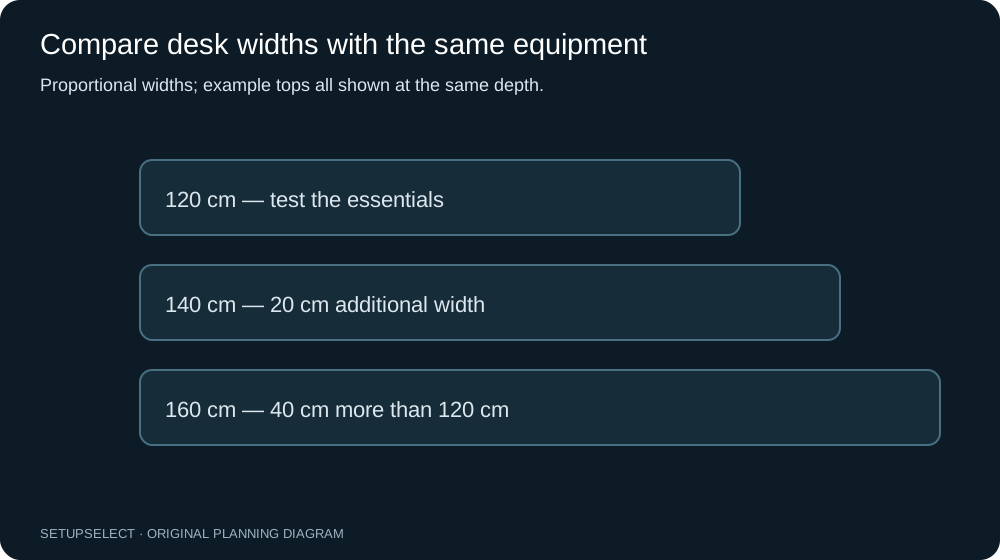
The desk-width comparison shows how to compare surfaces with the same equipment.
Plan one: keep the desk, improve the working position
This plan assumes the existing desk is stable, suitable for the equipment and large enough for the task. The main constraint is the seating or the laptop's coupled screen and keyboard positions.
Allocate most of the budget to a chair that meets the measured requirements, while reserving money for separate input devices and a suitable laptop support.
| Item or allowance | Illustrative allocation |
|---|---|
| Chair meeting the measured fit requirements | £170 |
| Separate keyboard and pointing device | £45 |
| Suitable laptop stand | £30 |
| Task-lighting allowance if needed | £25 |
| Cables, delivery or contingency | £30 |
| Total | £300 |
These are spending ceilings within the example, not recommendations for unnamed products. If no suitable chair is available within £170, reassess reuse, workplace provision or the timing of the purchase.
Do not buy an unsuitable chair simply to make the arithmetic balance.
The optional lighting allowance should remain optional. If the room already has suitable lighting, move that money to the unresolved fit requirement or keep it unspent. A budget is a limit, not a target that has to be exhausted.
Plan two: furniture first, using an existing screen
This scenario assumes you already have a usable computer and display or laptop support, but need a desk and chair. The challenge is preserving enough money for both to work together.
Compare desktop height and underside clearance with the chair's range before treating two individually attractive prices as a compatible pair.
| Item or allowance | Illustrative allocation |
|---|---|
| Desk in the measured room footprint | £90 |
| Chair meeting the fit requirements | £150 |
| Basic input or connection replacement | £25 |
| Delivery and assembly-related allowance | £20 |
| Contingency | £15 |
| Total | £300 |
A second-hand or refurbished item may widen the options, but condition and adjustment function need checking. Confirm stability, missing fittings, manufacturer identification and any applicable returns or warranty.
Do not infer that a used premium label is automatically a better fit than a simpler item with clear specifications.
If the suitable furniture costs more than the example, stage the setup rather than stripping away essential compatibility. Keep a functioning existing component for longer or delay a cosmetic upgrade.
The plan should support work now without making the next purchase replace something bought only weeks earlier.
Plan three: reuse furniture, add a better display arrangement
This scenario assumes the desk and chair already work well together. The limitation is the laptop display's size, position or available workspace.
A monitor can be a sensible investment, but include the complete connection path and input devices rather than spending the entire budget on the panel.
| Item or allowance | Illustrative allocation |
|---|---|
| Compatible monitor | £160 |
| Keyboard and pointing device | £45 |
| Verified cable or simple connection hardware | £25 |
| Laptop support or storage arrangement | £25 |
| Cable management and lighting allowance | £20 |
| Delivery or contingency | £25 |
| Total | £300 |
The monitor allowance does not promise a particular size, resolution or brand at a current price.
First decide whether a 24, 27 or 32-inch display fits the task and room, then research products that meet the actual requirement. A monitor that cannot run properly through your laptop or dock is not a bargain.
What to buy first
Buy in the order of the measured bottleneck. If typing on a raised laptop is the issue, separate input devices and a supported screen position may have the greatest immediate value.
If the chair cannot fit under the desk or support the working position, that relationship deserves attention before a second monitor.
If the room layout is the problem, changing furniture size may help more than adding accessories. If the computer connection is unreliable, a verified cable or appropriate dock may be more useful than a cosmetic desk shelf.
Keep the problem statement beside the shopping list so each item has a clear purpose.
The laptop setup guide offers three configurations you can adapt. Avoid turning a staged plan into a collection of products merely because they are commonly included in home-office roundups.
New, used and refurbished equipment
For a used chair, check adjustment controls, base, casters, upholstery and the availability of correct replacement parts. Record the exact model where possible.
A missing label or undocumented modification creates uncertainty, especially when load limits or assembly details matter.
For a used desk, inspect the top, frame, fittings and movement mechanism if present. Check that disassembly and transport are feasible. A large inexpensive desk can become costly if collection requires a vehicle, extra help or replacement hardware.
Include those costs before comparing it with a delivered alternative.
For a refurbished monitor, confirm input support, included stand, warranty and return conditions. Check the physical condition and display operation during the available inspection period.
The useful saving is the total cost of a functioning compatible setup, not the difference between a claimed original price and a listing price.
Avoid hidden accessory costs
Monitor arms introduce compatibility and mounting requirements; they are not automatically necessary. A suitable supplied stand may save money and simplify installation.
If an arm is needed to solve a real space constraint, budget for the correct supported attachment and verify the desktop before buying.
Docking stations can also consume a large portion of a small budget. List the required functions first: charging, external display modes, network and peripherals. A device with many ports is not useful if the needed display or power function is unsupported.
Check employer-provided options where relevant.
Small purchases accumulate. Cable clips, decorative lights, desk mats, shelves and organisers can quietly remove the contingency that was meant for delivery or a missing adapter.
Separate essential completion items from optional appearance changes and review the total before checkout.
Budget for the complete room arrangement
A desk needs space for the occupied chair and ordinary movement. A cheap deep top that blocks access can be more disruptive than a smaller, better-fitting surface.
Include the opening positions of doors, drawers and cupboards in the plan, and check the route from the entrance to the workspace.
Think about storage for items that should not stay on the desk. If paperwork regularly covers the keyboard, the solution may involve an existing shelf or a filing routine rather than a larger desktop.
Measure any proposed storage and keep important routes clear.
If electrical outlets are poorly placed, do not improvise an unsafe chain of extensions to make the layout work. Check equipment instructions and seek qualified advice where needed.
Professional work is outside these example budgets and should not be disguised as a trivial accessory cost.
A purchase comparison worksheet
For each candidate, record the delivered price, exact model, critical dimensions, included parts and return conditions. Add a short explanation of the problem it solves.
This makes it easier to reject a superficially attractive item that does not meet the requirement.
| Candidate | Delivered price | Critical fit evidence | Included essentials | Reason to buy |
|---|---|---|---|---|
| Chair | ______ | Height/depth/arm ranges: ______ | Fittings and base: ______ | ______ |
| Desk | ______ | Surface and underside: ______ | Assembly parts: ______ | ______ |
| Display | ______ | Housing, stand and inputs: ______ | Stand/cable: ______ | ______ |
| Input devices | ______ | Width and connection: ______ | Receiver/cable: ______ | ______ |
Leave unknown fields visible. A product should not win merely because its missing dimensions make the comparison look simpler. Ask the seller or manufacturer for information that materially affects the purchase.
Test the result before the return window closes
Use the setup through representative work rather than judging it only after assembly. Include typing, calls, paperwork, charging and getting up.
Check whether the desk remains serviceable when the laptop leaves for a meeting, and whether the chair moves appropriately on the actual floor.
Change one adjustment at a time. If something does not work, identify the conflict before ordering another accessory. A small budget benefits from a deliberate trial because replacing the wrong item can consume much of the remaining money.
Keep purchase records and relevant packaging until you understand the return process and are satisfied with the setup. Follow assembly and maintenance instructions.
Do not modify products in ways that compromise safety or prevent a legitimate return before confirming their suitability.
Handle a price change without breaking the plan
Suppose the desk allocation was £90 but the suitable model now costs £115 delivered. The remaining budget has fallen by £25; it has not become a reason to remove a necessary input device or buy a chair that fails the fit check.
Revisit optional storage, cosmetic accessories or the timing of the purchase first.
A simple shopping sheet can show the planned allowance, the current delivered price and the difference for each item. Add a separate column for whether the item is essential to the first usable setup.
This makes it clear which purchases can move to a later month.
For second-hand items, include transport and any known replacement part in the same line.
A cheap collection-only desk across the country is not necessarily cheaper after travel, and a missing proprietary component can make an apparently complete item unusable.
Keep screenshots or notes of the dimensions as well as the prices. The purpose of the £300 plan is to assemble a workable workstation, not to spend exactly the full amount or preserve an outdated basket at all costs.
Questions and next step
Can £300 buy a complete home office including a computer? That is not what these plans claim. They assume an existing computer and exclude software, broadband and professional installation. A different scope needs a different budget and prioritisation.
Should I spend most on the chair? Only if seating is the main unresolved requirement. Someone with a suitable chair but inadequate screen/input separation needs a different allocation. Measure the bottleneck rather than following a fixed percentage rule.
Are the prices current product offers? No. They are clearly labelled planning allowances that total £300. Verify real delivered prices before buying, and do not treat an allocation as evidence that a specific product is available within it.
Use the home-office builder to organise requirements and the desk comparison tool to investigate sourced dimensions.
The HSE home-working guidance provides broader workstation context.
This article's budget arithmetic and scenarios are original illustrative plans, not product tests, medical recommendations or a promise of retailer availability.
Continue researching