Buying guide
Office chair dimensions: measure seat height, depth and desk clearance
Useful office-chair dimensions include the adjustable seat-height range, usable seat depth, width between the arms, armrest adjustment and the chair's overall footprint.
Compare those with your body in a normal seated position, the underside of the desk and the space needed to move. A single advertised chair height cannot answer all of those questions.
This guide provides a repeatable measurement method and worked fit examples. It is a buying and layout aid, not a medical assessment or a guarantee that a chair will suit you.
If symptoms persist or you need an individual workplace assessment, seek appropriate professional support rather than trying to solve the problem from a dimension table alone.
Gather the right measurements
Use a tape measure, a firm reference chair, your usual work shoes and, if available, another person to help. Record measurements more than once and note any uncertainty.
Soft cushions, clothing and posture can change the result, so avoid treating a single millimetre reading as a precise specification.
Keep three columns in your notes: your measured requirement, the product's published range and what still needs a physical trial. This prevents body measurements being confused with furniture measurements.
A seat-height figure from an empty chair, for example, may differ from the height when its cushion compresses under a user.
Also record the current setup and what feels impractical about it. “The arms hit the desk before I can move close enough” is a more useful buying constraint than “I need an ergonomic chair”.
A specific conflict can be checked against dimensions, whereas a marketing label cannot.
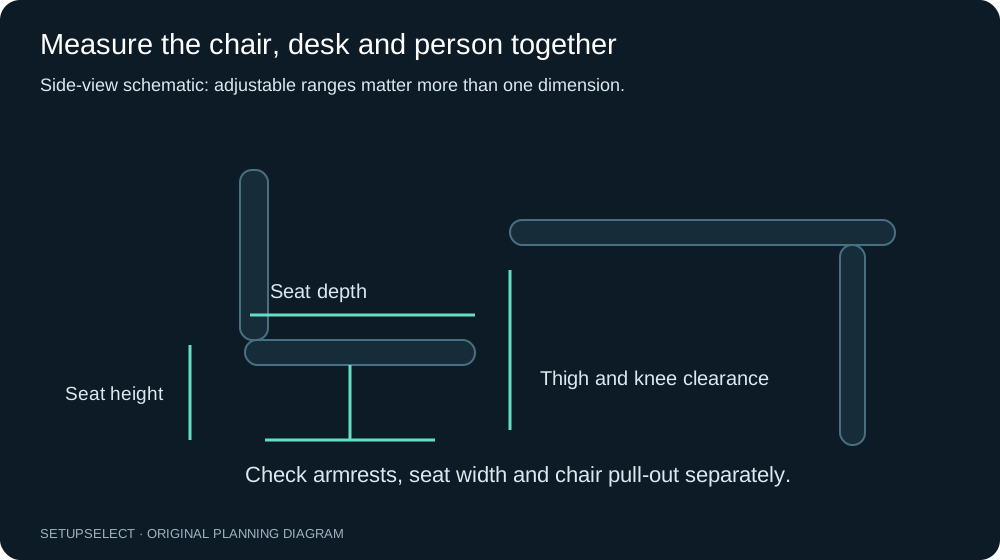
Seat height and lower-leg measurement
Sit with your feet supported and measure vertically from the floor to the crease behind your knee. This gives a useful reference when comparing seat-height ranges, but the final fit depends on the seat shape, cushion compression and how you sit.
Check the adjustment range rather than only the lowest or highest published setting.
As a hypothetical example, suppose your seated reference is 43cm and a chair's stated range is 46–56cm. The lowest setting is already above that reference, so it deserves investigation before purchase.
A second chair with a 41–51cm range includes the reference, but that alone does not prove it will fit; depth, width and desk relationship still matter.
If the desk requires a higher sitting position, supported feet may require a suitable footrest. Do not assume that raising the chair fixes every mismatch.
Check that thigh clearance remains adequate and that the seat edge does not create pressure behind the knees. A fixed desk and an unsuitable chair can constrain each other.
Seat depth is not overall chair depth
Seat depth describes the usable front-to-back support area of the seat. Overall chair depth may include the backrest, base or recline position and is not a substitute.
Ask whether the published figure describes the cushion itself, a usable seated dimension or an adjustable range.
Sit against a firm back reference and measure towards the back of your knee. The seat should support the thigh without forcing its front edge into the knee crease.
A visible gap is a useful practical check, but body shape and cushion design mean that a generic finger-width rule should not replace a trial.
For example, two chairs may both advertise a 50cm seat depth, while only one has a sliding seat pan. If your preferred support depth is shorter, the adjustable model may offer a useful range that the fixed model cannot.
Verify the minimum and maximum usable positions, not just the central specification printed in a comparison table.
Seat width and the space between arms
Measure across the widest relevant part of the hips or thighs in a relaxed seated position, wearing normal work clothing. Compare that with usable seat width and the clear distance between arm supports.
The overall external width of the chair can be much larger while the usable space remains constrained.
Allow for ordinary movement rather than selecting a seat that exactly matches a static body measurement. At the same time, a very wide chair can make armrests difficult to use if they cannot adjust inwards.
Record the armrest adjustment range and shape, not simply whether the chair has arms.
For shared seating, check each user's requirements. A chair that comfortably accommodates one person may leave another unable to reach its armrests or use its back support.
Adjustable ranges are valuable only when they cover the relevant positions and can be changed without unreasonable effort.
Armrests and desk clearance
With shoulders relaxed, measure from the compressed seat surface to the underside of the elbow in your usual working position. Use that as a reference for armrest adjustment, then check whether the arms can fit beneath the desktop or apron when needed.
The desk's lower structure, not just top height, determines that clearance.
Imagine a desk top at 74cm but an apron extending down to 67cm. A chair arm positioned at 69cm from the floor will collide with the apron even though it is below the desktop.
Lowering or removing the armrests may be possible on some models, but that must be a supported adjustment rather than an improvised modification.
Check movement as well as static height. Armrests can catch the edge when the chair rotates or reclines. An arm that clears the centre of the desk may strike a drawer at the side.
Rehearse the complete route into and out of the working position before deciding the chair tucks away properly.
Backrest, lumbar support and recline
Backrest height and support location are difficult to assess from a single product dimension. Record whether the support adjusts vertically, in depth or not at all, and whether those movements are independent.
A feature described as adjustable may have a limited range or may change another part of the chair at the same time.
Try the backrest in the positions you actually use. A chair that looks supportive in an upright photograph may behave differently when its recline mechanism is unlocked.
Check the controls and whether you can reach them while seated without an awkward movement. Understand the manufacturer's locking and tension instructions.
Do not assume that a particular lumbar shape will resolve discomfort. Fit is individual, and persistent symptoms warrant appropriate advice.
The buying task is to identify adjustable, trial-friendly options and exclude obvious conflicts, not to diagnose a condition from a product page.
Measure the desk as a three-dimensional object
Record desktop height, uninterrupted width and depth, then measure the clear opening underneath. Include drawers, crossbars, trays and angled legs. Measure at more than one height because the opening can narrow near the knees or floor.
Keep chair-base clearance separate from thigh and armrest clearance.
For monitor work, also record the support footprint, keyboard area and cable bends. A wide desk can still have insufficient usable depth.
The desk-depth comparison shows why eye-to-screen distance should be measured separately from desktop depth.
If the desk adjusts in height, check both its operating range and the equipment's movement. Cables, windowsills and shelves can interfere at one end of the range.
A successful seated measurement does not establish that the standing arrangement is safe or practical.
Chair footprint and movement space
The base diameter or overall width matters when a chair is beside storage or between desk legs. Its operating footprint also changes as it rotates, rolls back or reclines.
Draw those movements on the room plan rather than representing the chair as a single fixed circle.
As an illustrative layout, suppose a desk is 70cm deep and the opposite cabinet projects 45cm into a room 220cm deep. The remaining gap is 105cm before accounting for the occupied chair and any opening drawers.
That number alone does not certify access; test standing up, passing through and opening the cabinet with the actual chair position marked.
Keep doorways and required routes clear. A chair that has to be moved into a corridor whenever someone opens a cupboard may make the setup frustrating.
The workspace fit planner helps organise dimensions, but cannot certify accessibility or an escape route.
Three worked buying situations
First, consider a shorter user at a fixed-height desk. The existing chair reaches the keyboard comfortably only when raised, leaving the feet unsupported. Measure seat height, desk underside and elbow position together.
The answer might involve a suitable footrest, a different desk arrangement or a chair with a more appropriate range; it is not automatically a more expensive chair.
Second, consider a user who can reach the desk but cannot sit against the backrest without pressure behind the knees. Investigate usable seat depth and whether the seat pan slides.
A shallower or more adjustable seat may address the dimensional conflict, but the final decision requires a seated trial with the backrest and controls set correctly.
Third, consider a small room where the chair fits while occupied but cannot tuck beneath the desk. Check armrest height against the apron, base width against the legs and the route needed to turn.
Replacing a chair solely on its advertised overall width may leave the actual obstruction unchanged.
Printable measurement worksheet
Write an acceptable range where adjustment matters. Keep unknown product fields marked as unknown rather than estimating them from photographs.
If a retailer cannot provide a critical measurement, that uncertainty should influence the shortlist and returns decision.
| Measurement | Your reference or room limit | Product range or dimension | Trial or source checked |
|---|---|---|---|
| Floor to seated knee crease | __________ | Seat height: __________ | __________ |
| Back reference to knee crease | __________ | Usable seat depth: __________ | __________ |
| Seated width plus movement | __________ | Clear width between arms: __________ | __________ |
| Seat to relaxed elbow | __________ | Armrest adjustment: __________ | __________ |
| Desk underside height | __________ | Arm height from floor: __________ | __________ |
| Clear space between desk supports | __________ | Chair/base width: __________ | __________ |
| Chair pull-out and rotation area | __________ | Operating footprint: __________ | __________ |
| Delivery route and doorway | __________ | Package dimensions: __________ | __________ |
Trial the chair methodically
Adjust one feature at a time and record what changed. Begin with a supported sitting position, then bring the desk inputs and display into a workable relationship.
If you alter seat height, depth, backrest and screen position simultaneously, it becomes difficult to identify which change helped or introduced a new problem.
Use a representative work session rather than a brief sit. Include typing, pointing, reading, video calls and getting up. Check whether the chair moves appropriately on the actual floor and whether its controls remain accessible.
Follow the manufacturer's instructions for casters, assembly and maintenance.
Understand returns before assembly and keep packaging where practical. Check whether collection, disassembly or a return fee applies. A published specification narrows the risk, but it cannot replace a trial for subjective comfort and control usability.
Common measurement errors
Measuring the empty cushion instead of the occupied seat can distort height comparisons. Using overall chair depth as seat depth is another frequent mistake. So is comparing external width with hip space while ignoring the arm supports.
Record which dimension each source actually describes.
Avoid reading a photograph as a scale drawing. Perspective, lens choice and an unknown model revision can make an estimate misleading. Use labelled manufacturer dimensions or ask for the missing figure.
If sources disagree, keep the discrepancy visible and verify the exact model rather than averaging incompatible numbers.
Questions, sources and next step
What is the standard office-chair size? There is no single set of dimensions that fits every person and desk. Adjustable ranges, usable seat dimensions and the full workstation relationship are more useful than a generic standard size.
Should I buy the chair or desk first? Record body and room constraints before either purchase. If one item must stay, treat its dimensions as fixed inputs.
If both can change, compare them as a pair rather than solving one and discovering the other is incompatible.
Does a fit calculator replace an assessment? No. It organises measurements and can flag likely conflicts, but it cannot establish individual comfort or diagnose pain.
Use the chair fit profile and chair/desk calculator as planning aids.
The measurement approach is informed by the broader assessment framework in the HSE workstation checklist. Worked figures here are hypothetical examples, not clinical recommendations or tested product results.
Verify actual adjustment ranges and operating limits with each manufacturer's documentation.
Continue researching