Buying guide
Ergonomic laptop desk setup: three practical configurations
An ergonomic laptop desk setup starts by separating screen position from typing position, then fitting the chair, keyboard, pointing device and display to the person and task. A laptop stand can help, but it is not a complete solution by itself.
If raising the screen also leaves you typing on a raised built-in keyboard, you have moved the problem rather than fully addressing it.
This guide compares three practical configurations: a laptop on a stand, a laptop with an external monitor, and a shared compact desk that must reset after work. The examples are planning models, not medical advice or claims of personal product testing.
Persistent discomfort should be discussed with an appropriate professional or workplace assessor.
Measure before choosing accessories
Start with the equipment and furniture you already own. Record desk width, uninterrupted depth, underside clearance and the chair's adjustable ranges. Note where the screen sits, where the keyboard sits and which part of the arrangement creates difficulty.
A specific observation gives you a better starting point than a shopping list labelled ergonomic.
Measure in your normal work shoes and clothing, using a natural seated position rather than posing for a diagram. The chair and desk measurement guide provides a worksheet.
If the chair must be raised to reach a fixed desk, check foot support and thigh clearance together. An adjustment can improve one relationship while making another worse.
Include the room: glare, nearby doors, socket access and the route needed to stand up. A technically compatible stand can still be a poor choice if it blocks a window or makes the keyboard occupy the edge of a narrow desk.
Plan the whole working area before deciding which accessory deserves the budget.
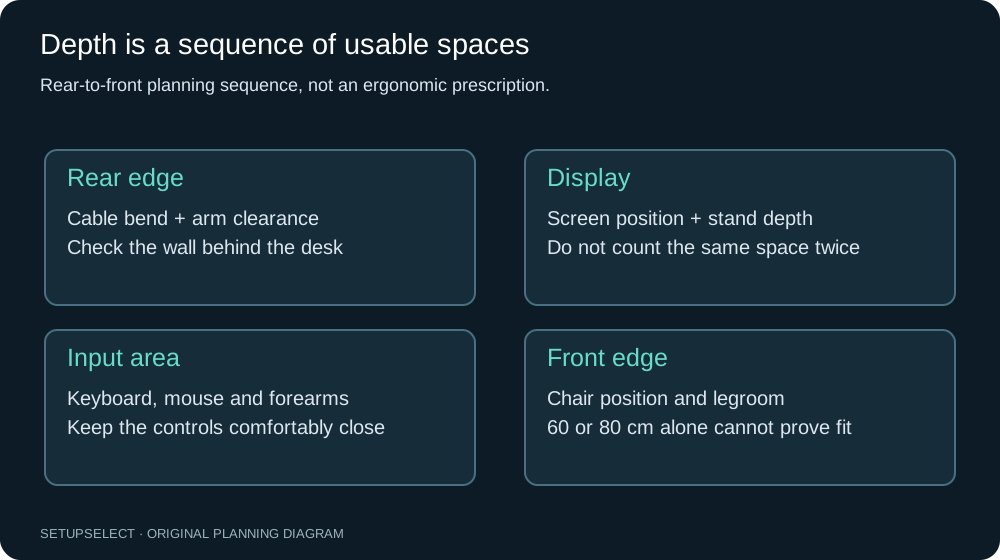
Choose the furniture before the finishing accessories
If you are buying a chair, desk and stand together, first establish the room's maximum desk footprint and the route needed to pull out the chair. Then check the chair's usable adjustment range against working height and the desk's underside clearance.
This is a coordinated fit decision, not a universal rule that one furniture item must always be bought first.
For an existing fixed desk, the chair must work with that constraint. For an empty room, testing a suitable chair can clarify the seated dimensions the desk must accommodate.
In either case, measure armrest width and height, drawer or frame obstructions, and the space needed to stand up. Do not reserve the entire budget for a desktop and discover afterwards that a compatible chair cannot fit.
Choose the laptop support after drawing the separate keyboard and pointing area. Check its operating footprint, supported device size and port access.
Before ordering all three items, rehearse the proposed positions with measured outlines and verify the parts of the furniture geometry that cannot be corrected by moving a small accessory.
Configuration one: laptop stand with separate inputs
The simplest desk-based change is often to raise or reposition the laptop while using a separate keyboard and mouse or another suitable pointing device. This decouples the screen hinge from hand position.
Choose the stand only after measuring its footprint, adjustment range and the laptop's dimensions and ventilation requirements.
Imagine a 120 × 60cm desk with a stand occupying a 28 × 25cm footprint, a compact keyboard 36cm wide and a 25cm pointing area. Those figures do not all belong in one row. Place the laptop towards the rear, then draw the keyboard and pointing area in front.
Check whether stand legs intrude into the input zone and whether ports remain accessible.
An adjustable stand can accommodate different tasks or users, but adds joints and controls that need to be stable under the intended load. A fixed stand may be simpler if its height and angle already suit the arrangement.
Verify the supported device range and any restrictions on typing directly on the elevated laptop.
Configuration two: external monitor with the laptop retained
An external display lets you position a larger screen independently while retaining the laptop for occasional reference or calls. Place the primary task first.
If most work happens on the external display, align the main input area with it rather than centring the keyboard between two screens merely for symmetry.
For an illustrative 140 × 70cm desk, a 60cm-wide monitor housing and a 34cm laptop with a 5cm gap form a 99cm screen row. That leaves 41cm total width, but the stand and laptop support can still compete for depth.
Measure both support footprints and keep the webcam, dock and power supply on the plan.
Check the full connection chain: laptop output, dock, cable and monitor input. Confirm charging power if a single cable is supposed to handle both display and power. A USB-C connector alone does not establish the supported functions.
If the work laptop is managed, confirm permitted hardware and settings before buying a dock.
Configuration three: compact shared desk
A shared table or small desk may need to return to another use each evening. In that case, the best setup is not necessarily the most adjustable permanent installation.
Consider a stable removable stand, a compact keyboard, a pointing device and a labelled cable bundle that can be moved without pulling on the computer.
Record both operating and stored dimensions. A folding stand may store neatly but need a much larger footprint when opened. A keyboard drawer can save surface but must provide suitable space and clearance when in use.
Do not judge a portable arrangement solely by how small the accessories look in their storage pouch.
Time a normal setup and reset. If connecting equipment requires crawling beneath the table or re-pairing devices repeatedly, the system may become too inconvenient to use consistently.
A simple repeatable arrangement is more useful than an elaborate one that remains packed away because setting it up feels like a separate task.
| Configuration | Main advantage | Main measurement risk | Useful first check |
|---|---|---|---|
| Laptop stand and inputs | Separates screen and typing position | Stand footprint collides with keyboard | Draw both operating areas |
| External monitor plus laptop | Independent main display | Supports and cables consume depth | Measure exact bases and connection path |
| Shared compact desk | Can reset for another use | Stored dimensions hide operating size | Rehearse setup and storage route |
Set the chair and inputs together
Use a supported sitting position as a starting point, then check the relationship to the keyboard and pointing device. Avoid solving keyboard height by leaving the feet unsupported or compressing the thighs against the desk underside.
If the fixed furniture creates a conflict, identify it explicitly rather than buying unrelated accessories.
Keep the pointing device usable without a long repeated reach. A full-size keyboard with a number pad may suit frequent numeric work but occupy more width than a compact layout.
A separate number pad can offer flexibility, although it is another object to store and connect. The appropriate choice follows the task, not a universal rule about keyboard size.
A trackball, touchpad or mouse changes the space and movement pattern. Do not assume one is automatically more ergonomic for everyone. Where possible, trial the input device and consider the work involved.
Device preference and individual needs can matter more than small differences in the advertised dimensions.
Position the screen for the actual task
Adjust display position and text settings together. If text is too small, moving the screen closer may conceal a scaling problem rather than solve the layout.
If the screen is far back because the desk is deep, bring it to a useful position instead of accepting the rear edge as a default placement.
Measure eye-to-screen distance from the seated working position, not from the desktop front edge. Check that the screen can be viewed without habitually leaning or twisting.
A second display used occasionally can sit to the side, while a display used continuously deserves more careful alignment with the main working position.
Use the monitor-size calculator and PPI calculator to understand geometry, not to prescribe one distance or scale for everybody.
The appropriate setup also depends on vision, software, lighting and the nature of the work.
Control glare and video-call compromises
Check the screen at different times of day. A position that looks good in the evening may face a bright window in the morning.
Consider the relationship between the screen, window and room lighting rather than trying to overcome reflections solely by increasing brightness. Keep ventilation and access to window controls available.
For calls, place the camera so the view is practical without making the entire workstation serve the camera. Raising the laptop to achieve a flattering angle can create an awkward input arrangement if separate devices are absent.
A small external camera or a different screen position may be more useful than a taller stand, but test the real need first.
Microphones, lights and headsets need their own space. Add their supports and cables to the plan before buying. A light clipped to a monitor may affect its balance or mounting requirements, and an arm microphone can occupy the same sweep as a screen arm.
Check manufacturers' mounting instructions rather than stacking accessories by appearance.
Keep cooling and access intact
Laptop cooling arrangements vary. Some draw air through the underside; others use different intake and exhaust paths. Use the manufacturer's instructions to establish which areas must remain clear.
A soft pad, enclosed holder or improvised support can obstruct airflow even if it seems to provide a comfortable height.
Allow access to power, display and peripheral ports without sharply bending cables. If the laptop needs to leave the desk regularly, identify which connections are removed and where the cables remain.
A docking arrangement should reduce repeated handling without placing strain on a single connector.
Closed-lid use is product-specific. Confirm operating support, cooling requirements and how the computer will wake or authenticate. Do not assume that placing any laptop vertically behind a screen is a safe or supported way to free desk space.
A staged buying order
First address a clear input/screen coupling problem with suitable separate input devices and a supported laptop position. Then assess whether the chair and desk ranges can work together.
Only after those relationships are understood should an external display or arm be treated as the next automatic purchase.
If the chair cannot reach an appropriate range, a stand alone will not fix it. If the desk is too shallow for the chosen supports, a more expensive keyboard may not help. Spend against the measured bottleneck.
The £300 home-office plans show different allocations rather than one supposedly universal bundle.
Keep a small allowance for the unglamorous items that complete the setup: a verified cable, suitable foot support where needed, or removable cable management. A budget used entirely on a headline product can leave the practical installation unfinished.
Test one change at a time
Record the starting position, make one adjustment and use it through representative tasks. If you change chair height, screen position, keyboard angle and input device simultaneously, you cannot easily tell which change helped.
Short notes about specific problems are more useful than a general comfort score after two minutes.
Include getting up, reaching storage and returning to work. Check whether the arrangement remains stable after the laptop has been removed for a meeting. A setup that depends on a precise stack of loose objects may drift each time it is used.
Prefer supported, repeatable adjustments over improvised structures.
Do not use persistent pain as a reason to continue experimenting indefinitely. Stop and seek appropriate advice where necessary.
This guide supports measurement and purchasing decisions; it does not diagnose symptoms or promise that a particular posture, accessory or chair will treat them.
Common errors to avoid
Raising the laptop while continuing to type on its elevated keyboard is a common incomplete change. So is placing the external keyboard at the front edge because the stand occupies everything behind it.
A neat cable bundle can also conceal tension on connectors when the screen or desk moves.
Another mistake is copying somebody else's exact measurements. Body dimensions, vision, task and equipment differ. Use an example to understand the sequence of checks, then substitute your own measurements.
The same applies to product photography, which rarely shows every socket, support foot or clearance.
Finally, do not let a visually minimal setup remove useful functions. If you need a number pad, documents or a headset for work, provide deliberate places for them.
The purpose is a workable daily arrangement, not a desk that looks empty only when nobody is using it.
Your setup worksheet
- Identify the primary screen and the tasks that need simultaneous visibility.
- Record chair ranges, desk underside clearance and usable depth.
- Measure the laptop support, keyboard, pointing area and any secondary devices.
- Check cooling, ports, cable movement and the daily connection routine.
- Trial readable display settings and representative work tasks.
- Keep a list of unresolved measurements before buying replacements.
The laptop desk wizard turns these questions into a practical plan. For cables, use the no-drill cable-management guide.
For the wider assessment context, consult the HSE home-working guidance and workstation checklist.
Frequently asked questions
Do I need an external monitor? Not necessarily. A laptop screen on a suitable support with separate inputs can be a useful improvement.
An external display becomes more compelling when the existing screen's physical size, workspace or adjustment is the actual limitation.
Is an adjustable stand always better? Adjustment is useful when its range addresses a real need and the stand remains stable. A fixed stand that fits the measured arrangement may be simpler.
Verify the supported device dimensions and load, not just the number of adjustment positions.
Can I use this as a complete workstation assessment? No. The guide is a practical starting point and a way to organise measurements.
Individual needs, persistent symptoms and workplace requirements may call for a broader assessment by an appropriate person. All worked layouts here are illustrative, and no product is described as personally tested.
Continue researching