Buying guide
Small-room video calls: camera, light and clear audio
The most useful small-room video-call upgrade is the one that fixes a problem other people can actually see or hear. Before buying a webcam, record a short call at your usual meeting time.
A dark face, distant voice, distracting reflection or camera pointing up from a laptop each needs a different solution. A more expensive camera does not automatically resolve any of them.
This guide builds a repeatable call position around framing, daylight, voice capture and a quick pre-meeting check. The room examples are illustrative planning exercises, not equipment tests.
For everyday keyboard, chair and screen positioning, use the separate ergonomic laptop setup guide; a call arrangement still has to work when the meeting ends.
Start with a recording you can compare
Use the camera, microphone and meeting application you normally use. Sit naturally, speak for thirty seconds, type a sentence, turn towards your notes and pause in silence.
Include a short section with your hands moving if you regularly demonstrate objects or use a whiteboard. Save this as the baseline, subject to your workplace's recording rules, without including colleagues or confidential material.
Listen on headphones and inspect the image at ordinary meeting size. A full-screen preview exaggerates imperfections that may not matter in a small participant tile.
Conversely, readable papers behind you, a reflective wardrobe or a very distant microphone remain practical problems even when the image looks sharp. Write down the two most disruptive issues, then change one variable and repeat exactly the same passage.
Zoom's audio testing instructions explain how to select a speaker and microphone and hear a recorded playback.
Its test meeting also lets you check the connection and meeting controls.
Other platforms have their own previews; use the one that reflects your real calls rather than judging only the camera manufacturer's demonstration app.
Establish the camera position before decorating
Start with the lens close to eye level and near the screen area where you view participants. That is a useful starting position, not a fixed measurement for every person. Look at the preview while sitting comfortably.
Your face should remain framed when you lean back slightly, with enough space for normal gestures and no need to hold an artificial posture.
A laptop placed flat on the desk often creates a low camera angle. Raising it can help, but working all day on its raised keyboard creates a separate compromise.
A stable stand plus separate keyboard and mouse, or an external camera on a sensibly positioned display, usually makes the two tasks easier to reconcile.
Check camera clips against the screen thickness and avoid covering sensors, vents or a fragile display edge.
Do not raise the camera so far that you must look up throughout meetings. Move the meeting window near the lens when speaking, and put reference material close enough that checking it does not require turning completely away.
A second monitor is useful for documents, but placing the audience on one screen and camera on another can make every conversation look like a profile interview.
Understand what a wide lens includes
A camera's field of view affects how much room appears behind and beside you. A wide setting may include a doorway, bed and shelving even in a tiny office.
Cropping can create a quieter frame, but it also removes image information; the result depends on the camera, app and output resolution. Check the actual crop instead of buying solely from a resolution label.
Mark the comfortable chair position and compare a normal and narrower framing. Then deliberately move as you would during a call. If your shoulders disappear whenever you reach for water, the crop is too tight.
If another person's route through the room remains visible, turn the desk slightly or change the background direction before buying an elaborate screen.
Objects near the edge of a wide frame can look stretched. Keep anything you need to demonstrate near the middle, and check that autofocus does not hunt between your face and the object.
For frequent close-up demonstrations, a separate document camera or a second planned view may be more practical than repeatedly moving the main webcam.
Place daylight in front or to the side
A window behind your chair can make the background much brighter than your face. The camera may darken you or wash out the window, depending on its processing.
First try turning the desk or camera position so daylight reaches your face from ahead or diagonally. This costs nothing and shows whether lighting, rather than camera resolution, is the limiting factor.
Direct sun is different from diffuse daylight. A window that looks flattering at nine can create a bright stripe across your face at eleven. Check recurring meeting times, including winter afternoons if the room is used throughout the year.
Existing blinds or curtains may be the simplest way to control variation. Keep window access practical so adjustments are easy during the day.
Side lighting can provide a clear image without putting the monitor directly in front of the glass, but strong light from only one side may leave the other noticeably dark. Try a modest lamp on the darker side and compare the recording.
You do not need a symmetrical studio arrangement; you need a face that stays visible without making the working position uncomfortable.
Add a lamp with a specific job
If evening calls are the problem, choose a controllable light that can illuminate your face without shining directly into your eyes. A diffused lamp placed near the camera and slightly to one side is a sensible experiment.
Start at low brightness and adjust its position before increasing output. A very bright lamp close to your face can create discomfort while leaving the rest of the room dim.
Glasses require a separate reflection check. Move the light sideways or higher within a stable, comfortable arrangement, and watch both lenses as you turn your head. A ring light is not automatically the answer: its shape may be clearly visible in glasses.
Avoid solving the reflection by adopting a head angle you cannot comfortably maintain.
Mixed light colours can make skin and white objects appear inconsistent. Compare the window-plus-lamp arrangement with the lamp alone after dark.
If the lamp has adjustable colour temperature, use that control to improve the actual preview rather than following a universal numerical setting. Keep bright decorative lights out of the camera's direct view if they distract or affect exposure.
Bring the microphone closer before making it more sensitive
A microphone on the far edge of a desk must pick up your voice across a larger part of the room. It may also capture keyboard taps, a computer fan and reflections from nearby surfaces. A headset microphone follows your head and can keep a consistent distance.
That is particularly useful when you move between notes, screens and a standing position.
For a separate microphone, follow the manufacturer's orientation and distance guidance. Some are addressed from the side; others from the end. Pointing the wrong part at your mouth is not something a higher price fixes.
Position it so speaking does not require leaning forward, and check that its base or arm does not obstruct the keyboard or camera frame.
Record a passage with normal typing, then move the microphone away from the keyboard or mechanically noisy desk area and repeat it. If the improvement is clear, placement has solved a defined problem.
Adding more gain may simply make both speech and unwanted sounds louder. Use the app's input meter and playback, checking for distortion on louder words as well as quiet syllables.
Separate echo, background noise and connection faults
Echo can mean different things. Hearing your own voice returned after a delay may involve speakers feeding another microphone or two joined devices in the same room. A hollow or reverberant voice is more often a room-and-distance issue.
Broken or robotic sound may instead be a connection or processing problem. Buying acoustic panels before distinguishing these symptoms is an expensive guess.
Try headphones first when speaker audio appears to return through the microphone. If you use a phone as a second camera, avoid leaving its meeting audio active alongside the computer.
Check the application has selected the intended input after docking, pairing a headset or reconnecting a webcam; the device name matters more than whether an input level merely moves.
For a hollow recording, compare speaking close to the intended microphone with speaking from the normal seat position.
Existing curtains, upholstered furniture and rugs may change room reflections, but none guarantees sound isolation from neighbours or traffic.
Avoid covering equipment vents with fabric, and do not attach decorative foam to rented walls without understanding its material and removal requirements.
Three small-room layouts to try
| Room constraint | First arrangement to test | What to check in the recording |
|---|---|---|
| Desk faces a blank wall, window at the side | Camera near screen centre; diffuse side daylight | One side of face, glasses reflections, doorway in frame |
| Desk must face a window | Screen and camera positioned without blocking access | Direct sunlight, screen readability, changing exposure |
| Shared bedroom with evening calls | Narrower frame, modest front light, headset | Bed or mirror visibility, background blur edges, quiet voice clarity |
In the first example, imagine a 120cm desk beside a window. Keep the workstation position that already works, then rotate the camera slightly towards a plain section of background. Test the lamp on the side away from the window.
The improvement comes from controlled framing and balanced visibility, without moving all the furniture.
In the second, a window-facing desk gives useful daytime light but little control over direct sun. A blind and a dependable evening lamp may provide more value than changing the webcam.
In the third, a headset and tighter camera view reduce the amount of shared space involved in each call. The practical success test is whether another household member can still use the room as agreed.
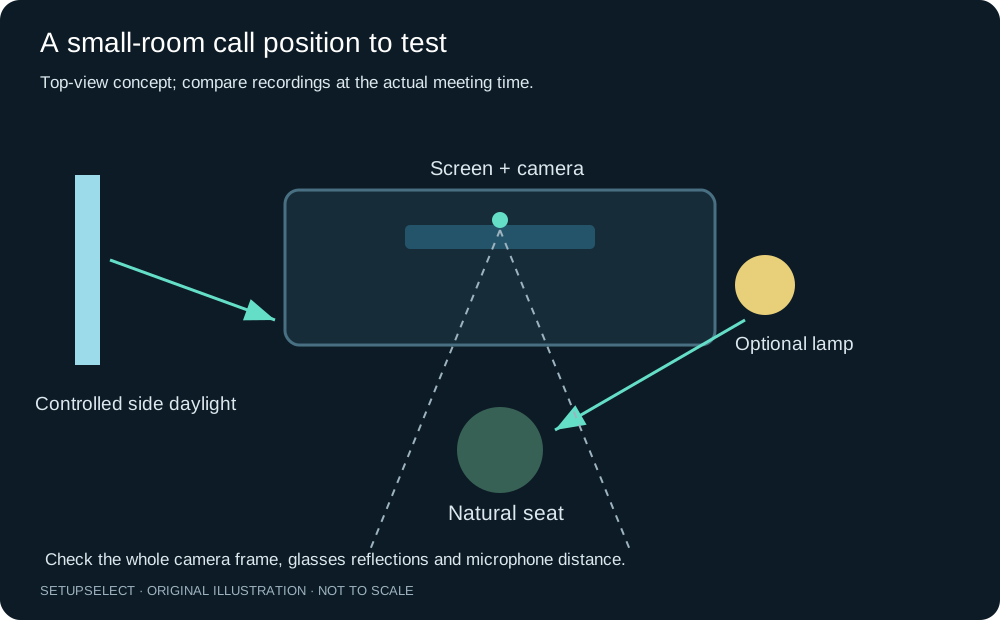
The diagram shows a position to test, not a prescribed camera height or lighting measurement. If camera placement depends on moving the display, the monitor-arm guide explains the mounting checks.
An arm is optional, and a stable existing screen stand may already provide the position you need.
Privacy needs a real-room check
Inspect mirrors, framed glass, windows at night and glossy cupboards as well as the obvious background. A reflection may show a person or document that is outside the direct camera view. Put confidential paperwork away before relying on blur.
Virtual backgrounds are convenient presentation features, but their edges can fail around hair, chairs, hands and moving objects.
Test what happens when you stand up or leave the seat. Some cameras or apps automatically reframe, which can reveal more of the room than your original composition.
Disable or configure features that conflict with your privacy needs, following the relevant software instructions. A physical shutter, where provided, gives a visible way to cover the lens between calls, but does not control microphone access.
Keep a household signal for meetings if the room is shared. A simple agreed sign can be more useful than expensive background furniture.
Schedule particularly sensitive conversations for an appropriately private space; camera cropping does not stop other people hearing the discussion.
Spend according to the failed test
| Observed issue | Low-cost experiment | Purchase only if the experiment supports it |
|---|---|---|
| Face is dark | Turn towards controlled daylight | Adjustable diffused lamp |
| Voice sounds distant | Try an existing wired headset | Compatible headset or correctly positioned microphone |
| Camera angle is awkward | Trial a stable raised laptop position | Stand and separate input devices, or external webcam |
| Room appears too wide | Try the app's available crop | Camera with suitable framing controls |
| Picture freezes | Compare connection and app conditions | Network change after isolating the cause |
Keep purchases compatible with work restrictions. A managed computer may prevent software installation, external recording or certain USB devices. Verify the approved connection and app support before ordering.
A camera's highest advertised resolution may not be available in your meeting application or over the chosen connection.
Use the setup audit to collect issues and the home-office builder once you know the missing category. Do not turn a single bad call into a complete equipment replacement.
Save the improved recording and compare again after a normal week of use.
A two-minute routine before an important call
Close or reposition anything that has appeared in the background since the last meeting. Check daylight, set the lamp, open the correct meeting app and confirm its named camera, microphone and output. Speak a short sentence and watch the input response.
Place notes where you can consult them without facing away for long periods.
Check that the laptop has power and that a headset has enough charge for the expected duration. Silence avoidable notifications, close unnecessary applications according to workplace policy, and keep a compatible fallback headset within reach.
If the camera or microphone fails, knowing which single cable and device to substitute is more useful than a box of unlabelled accessories.
Questions about difficult call setups
Can I put a webcam below an external monitor? You can test it, but the lower viewpoint may be less natural and more likely to show the underside of your face. Check the actual image while sitting normally.
A higher lens position is useful only if it does not force an uncomfortable screen or chair arrangement.
Why does my new microphone sound worse than the laptop? It may be facing the wrong direction, too far away, set to the wrong level or selected differently in the meeting app.
Reproduce the same spoken passage and verify orientation and input selection before assuming the hardware is faulty.
Will background blur hide my bedroom reliably? It can reduce visual distraction, but should not be treated as a privacy barrier. Test movement and reflections, then remove sensitive items from the real scene.
A simpler physical background remains useful even when blur is enabled.
Should I buy a 4K webcam for ordinary meetings? Decide from the image and framing problem, app support and connection limits. Extra resolution may help some crops, but cannot by itself correct poor lighting, an unstable mount or distant audio.
A stable, intelligible call is the more meaningful target.
Continue researching