Buying guide
Renter-friendly home office: mounts and furniture without drilling
A home office without drilling should be easy to use, easy to inspect and realistic to remove. Freestanding furniture, compatible clamps and carefully selected removable accessories can provide that flexibility.
However, a product described as no-drill can still crush a desktop, stain a finish, pull off paint or require a furniture safety fixing that your room cannot accommodate.
The useful question is therefore not simply whether an accessory uses screws. Ask what supports it, what touches the property, how it behaves during normal movement and how you will remove it. This guide focuses on those attachment and surface decisions.
The separate small-desk cable guide covers cable routes, movement loops and accessible power in detail.
Define what must remain reversible
Separate landlord-owned surfaces from your own furniture. A clamp on a desk you own presents a different practical decision from an adhesive organiser on a furnished rental's veneer.
Read the relevant tenancy or accommodation requirements and obtain any permission they require. The phrase renter-friendly on packaging does not establish permission or compatibility with the actual finish.
Make an inventory with four columns: item, contact surface, fixing method and removal method. Include furniture feet, chair castors and objects resting on shelves, not just wall attachments.
A workstation may leave its most obvious marks under a chair or beneath a rubber lamp base rather than where you expected. Photograph existing condition for your records before assembling the new arrangement.
Decide which tasks genuinely need an attachment. A desk lamp can often stand on its own base. A screen can remain on its original stand. A headset can live in a drawer.
Removing unnecessary mounting jobs simplifies both installation and moving day, while preserving your budget for furniture and equipment that improve daily work.
Choose furniture that works safely in the room
Freestanding does not mean that every piece can safely be used without anchoring. Some storage units require a wall fixing in their assembly instructions. If that fixing is required and cannot be installed, select different furniture rather than omitting it.
A shorter unit, a suitable mobile pedestal or existing built-in storage may solve the actual storage problem with fewer installation constraints.
Check stability with the intended use in mind: drawers opening, a printer operating, someone reaching into a cupboard and a chair moving beside the unit. Follow the manufacturer's loading and assembly instructions.
Do not assume adding weight at the bottom makes an otherwise unsupported arrangement acceptable. Keep heavy items where the furniture design and instructions permit them.
A folding desk needs its own checks. Confirm the locking mechanism, permitted load, usable work surface and the way it folds when equipment is removed.
If clearing it requires disconnecting several devices and lifting a heavy screen every evening, the arrangement may be reversible but still impractical. Rehearse that routine before making it your daily office.
Read the desktop as a structure
Clamps need more information than the desk's overall thickness. Inspect the edge profile, underside frame, distance from edge to rail, surface material and construction. A broad top may be hollow or contain lightweight internal sections.
A decorative lip can prevent a clamp from sitting flat even when the nominal thickness falls inside its adjustment range.
Check the furniture maker's accessory guidance alongside the clamp's requirements. Glass, stone, thin composite and hollow-core tops deserve particular attention because a compatible-looking gap does not establish acceptable loading.
A reinforcement plate is not a universal cure; it must be suitable for the desktop and the accessory, and may still be prohibited by the relevant instructions.
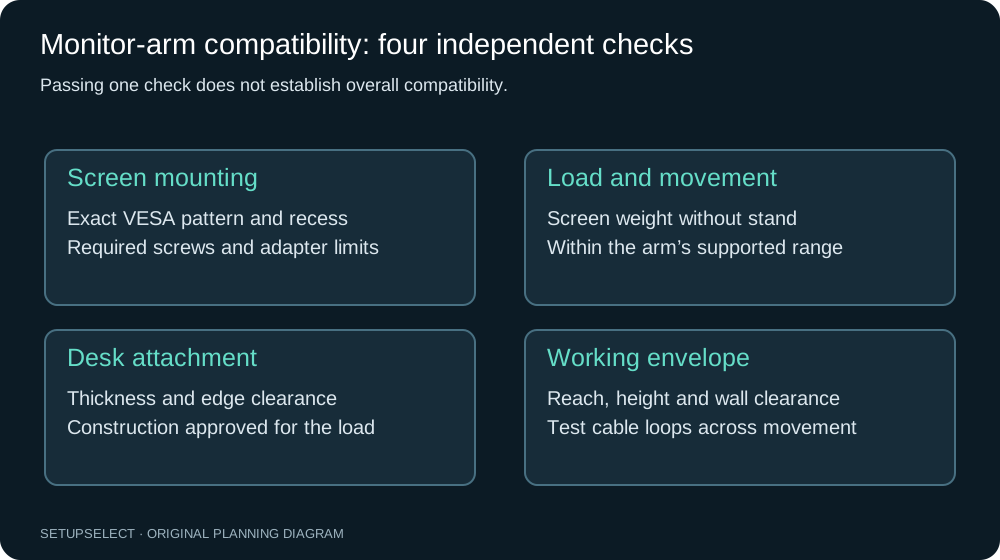
Keep the support location accessible. A clamp hidden against a wall is harder to install correctly and inspect later. The monitor-arm compatibility guide explains screen weight, mounting pattern and arm range.
Those screen checks are additional to, rather than substitutes for, the desktop checks here.
Measure the whole clamp assembly
Record the top contact pad, lower pad, screw travel, adjustment handle and the structure behind them. Some clamps need room below the desk to turn a screw; others need enough rear clearance to insert the body before tightening.
A cable tray or modesty panel may obstruct installation even if it does not touch the final clamp position.
For an illustrative desk, suppose the top is 25mm thick but a steel rail begins 35mm behind the edge. An accessory whose lower pad must reach 60mm inward cannot be judged from the 25mm thickness alone.
Obtain the clamp drawing or ask the manufacturer for the missing dimension. Guessing from a photograph can leave you with an accessory that cannot seat properly.
Install using the supplied pads and tightening instructions. Additional improvised padding may alter grip or contact pressure, and excessive tightening can damage the surface.
Once fitted, move the accessory only through its intended range while watching the clamp and desktop. If the support slips, distorts or feels unstable, stop and resolve compatibility rather than simply tightening harder.
Treat adhesive claims as product-specific
An adhesive system has several dependencies: the strip, the object, the paint or finish, the underlying surface, preparation, temperature and removal access. A quoted weight limit does not prove that old paint is firmly attached to plaster.
Nor does success on one part of a wall guarantee identical performance on a patched or damp area nearby.
For a concrete example, Command's picture-hanging instructions specify a waiting period after painting, exclude wallpaper and valuable or irreplaceable items, and give a particular stretch-removal method.
These are instructions for that product family, not permission to use any adhesive hook on any finish. Read the packaging for the exact product and market you purchase.
An inconspicuous trial can reveal a problem, but cannot guarantee that a larger installation will remove cleanly months later. Where the finish is unknown or permission uncertain, a freestanding option is often easier to evaluate.
Avoid supporting expensive equipment above people or a fragile screen with an improvised adhesive arrangement.
Plan removal before application
Look for the release tab or other removal feature and imagine reaching it with the accessory installed. If the tab will be trapped behind a shelf, squeezed into a corner or hidden beneath a permanent cover, the intended removal method may be impossible.
Leave the access required by the instructions rather than trimming visible tabs for appearance.
Keep the product identification and instructions in a moving folder or a simple digital note. Record where each adhesive or clamp is installed. Months later, two similar-looking products can require different treatment.
Photograph the fixing itself before it becomes obscured by the object, so you can see how it was assembled without pulling at it blindly.
Do not assume heat, solvent, scraping or force is an acceptable shortcut. A method that releases one adhesive may damage a coating or plastic part. If removal fails, consult the manufacturer's troubleshooting guidance and the property owner where relevant.
It is easier to pause while an item remains supported than after paint or furniture has started to tear away.
Compare mounting approaches by their real constraints
| Approach | Best reason to choose it | Hidden measurement or condition | Moving-day task |
|---|---|---|---|
| Original screen stand | No extra attachment to furniture | Base footprint and screen position | Remove cables and pack the stand |
| Compatible desk clamp | Recover useful desktop area | Edge geometry, structure and underside access | Support the load before releasing clamp |
| Freestanding lamp or riser | Flexible position | Stable base and permitted load | Inspect contact surface and lift carefully |
| Removable adhesive accessory | Organise a light, supported item | Finish, preparation and release access | Follow the exact removal sequence |
| Mobile drawer unit | Portable storage | Stability, drawer travel and floor suitability | Empty and secure drawers as instructed |
This comparison does not assign a universal winner. A large monitor stand might consume space you genuinely need, while a compatible clamp may solve that problem neatly.
Conversely, a clamp that demands a different desk creates more cost and uncertainty than keeping the existing stand. Compare the complete arrangement, including the furniture it depends on.
Protect the floor without creating another problem
Check the floor type and the furniture or chair manufacturer's recommendations before selecting castors, glides or a mat. A protector intended for carpet may behave differently on a hard floor.
A mat can shift, catch a door or develop an edge that interrupts the chair route. Measure the chair's movement, not just the footprint when it is tucked beneath the desk.
Keep contact areas clean and inspect them periodically. Grit trapped under a mat or furniture foot can mark a surface despite the presence of a protective layer.
Consider whether a rubber or plastic backing is compatible with the floor finish, and follow any cleaning or ventilation guidance. Avoid promising yourself that a generic mat makes all surfaces safe.
If the office shares a bedroom or living room, check the entire walking route with the chair pulled out. A thicker protector that works under the desk may be unsuitable across a doorway.
The workspace fit planner helps establish the furniture footprint, while the final physical check confirms edges, thresholds and ordinary movement.
Three reversible office scenarios
Furnished rental with an unknown desk top. Keep the original monitor stand and use a freestanding lamp. Put small accessories in a drawer or portable caddy. Obtain the desk's construction details before considering a clamp.
This approach leaves fewer assumptions about furniture you do not own, and the caddy makes the work area easy to clear at the weekend.
Owned desk in a rented room. Verify a clamp-on monitor arm against the desk and display, then keep wall surfaces untouched if that is the agreed constraint. Store the original screen stand and all removed screws in a labelled bag.
The arm can travel with the desk, but retaining original parts gives you another option when the next room has different clearances.
Dining table used for occasional work. Use a stable laptop support and separate input devices that fit in a portable box. Choose a lamp that can move without unwiring the room.
Trial the complete setup and pack-away sequence at the real table; the project succeeds only if meals and other household uses can resume without a prolonged dismantling job.
These examples prioritise different limitations. They do not require buying the same set of accessories. Use the home-office builder to shortlist missing items after deciding which scenario most closely matches the property and routine.
Keep moveable equipment genuinely portable
Choose accessories that can be disconnected without dismantling unrelated supports. A laptop that travels daily needs a reachable connection point. A lamp moved to another room should not have its lead trapped beneath a monitor clamp.
Refer to the no-drill cable routing guide for the detailed routing plan once equipment positions are settled.
Keep small hardware in labelled bags: original screen screws, stand parts, clamp pads and adjustment tools. Include the model name rather than a label saying only “desk bits”. Store assembly instructions alongside them.
This makes removal reversible in practice, and helps avoid replacing equipment simply because its original mounting parts have disappeared.
Measure portable storage with the equipment inside. A caddy that fits a laptop diagonally may not close with its charger and mouse. Add a soft separation where the equipment maker permits it, and avoid stacking weight onto delicate screens or connectors.
The transport arrangement should protect devices as well as make the desk look tidy.
Inspect after ordinary use
Check attachments after the initial settling period recommended by their manufacturers, after moving furniture and whenever the load changes. Look for slipping, indentations, loose parts, lifting adhesive edges or damage to a contact surface.
Do not keep using a failing support while waiting to see whether it stabilises.
Also check whether the installation still serves its purpose. A clamp lamp that is bumped every time a cupboard opens may need a different location. A removable shelf that blocks window cleaning is not convenient just because it can eventually be detached.
Good reversibility includes normal access for cleaning, maintenance and the other uses of the room.
Before moving out, remove equipment in a supported order. Unplug as instructed, take heavy devices off their accessories and release fixings according to their manuals. Compare the surfaces with your initial photographs and document any issue clearly.
Leave adequate time for the process; hurried removal is when accessible tabs and stored instructions become particularly valuable.
Questions renters often encounter
Can I clamp a monitor arm to an inexpensive hollow desk? Only if the relevant desk and arm requirements support that installation. Thickness alone is insufficient.
Check construction and mounting guidance; if compatibility cannot be established, use an appropriate stand or a different supported furniture arrangement.
Is a tension pole a guaranteed no-damage option? No. It still transfers force to the surfaces it touches and has product-specific installation and load requirements. Assess ceiling and floor suitability, required pads and removal consequences.
Do not treat the absence of drilled holes as evidence of compatibility.
Can I use extra adhesive strips to increase the supported weight? Follow the exact manufacturer's permitted configuration. Adding strips arbitrarily does not establish a safe higher capacity, and the wall finish may remain the weak point.
Select an appropriate mounting method rather than extrapolating a rating.
Should I remove a successful test strip straight away? Follow the product's installation and removal instructions when making any trial.
A clean trial is useful information about that location and moment, but not a guarantee for every surface or future condition. If damage would be unacceptable, choose a method that avoids that finish.
What is worth buying if I expect to move soon? Prioritise items with clear usefulness in the next home: input devices, a suitable chair, a portable lamp and compact storage. Check furniture dimensions against access and transport constraints.
The under-£300 office guide helps allocate spending without making permanent installation the centre of the project.
Continue researching