Buying guide
What size TV stand do you need? Measure before you buy
Check TV width, feet spacing, stand depth and cabinet load limits. Use the cabinet-fit calculator before choosing furniture for your TV.
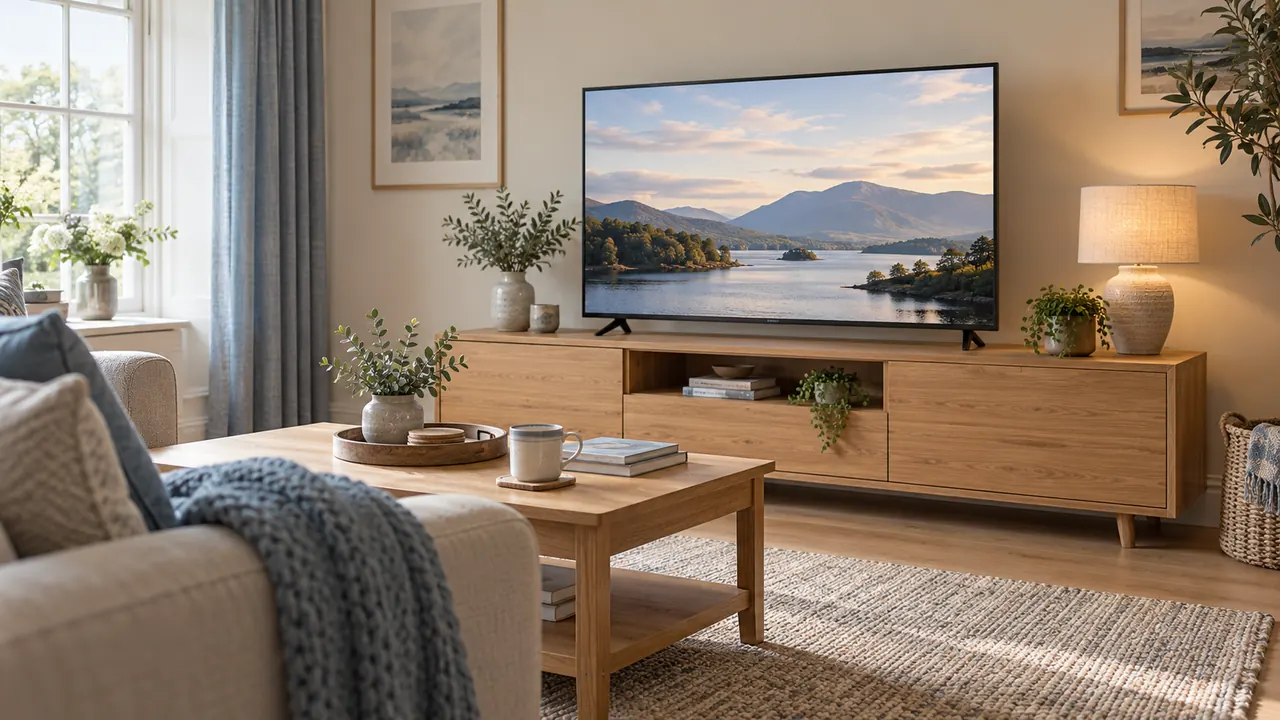
You’ve found a 65-inch TV you like. Before you order it, check how far apart the feet sit and how much room they need from front to back. Then check your cabinet can take the weight of the TV, stand and anything else on top.
Use the specs for the exact TV and the stand position you plan to choose.
If you're replacing an older set, start by measuring the cabinet you already have. A newer TV can be lighter and still need more room because the feet are farther apart or the pedestal sticks out more.
Take a fresh measurement of the cabinet top and check its load limit before assuming the replacement will fit.
Use the TV calculator's physical fit check to organise the measurements.
If you are still choosing the picture size, read 55 vs 65 vs 75-inch TVs first, then return here with a model shortlist.
Compare factory stand positions and weights in the TV cabinet model shortlist, or enter the dimensions of a television you already own.
Collect the right dimensions
Open the TV maker's specifications and look for a drawing of the stand. If a shop only lists one set of dimensions, check whether the stand is included. You’ll also see a box size on some product pages.
That's useful for getting the TV through your front door, while the stand measurements tell you what will sit on the cabinet.
Make a note of the TV's width, height, depth and weight with the stand fitted. Then look at the parts that actually touch the cabinet. How far apart are the feet? How deep is the base?
If you can fit the feet in more than one position, keep a separate set of measurements for each.
| Measurement | What it helps establish | Common mix-up |
|---|---|---|
| Full housing width | Space between walls, shelves and nearby objects | Using the picture width |
| Height with stand | Screen position and clearance below shelving | Using the panel height alone |
| Overall depth with stand | Furniture depth and room projection | Using the thin panel's depth |
| Foot spacing and footprint | Where the support points land | Assuming the feet sit at the panel edges |
| Weight with stand | Relevant furniture load check | Using weight without stand |
| Rear connection space | Access for plugs and cable bends | Measuring to the bare rear cover |
If a crucial dimension is missing, ask the manufacturer or retailer for the model's drawing. Do that before ordering rather than filling the gap with a measurement from a similar-looking television.
Measure the flat part of your cabinet
Measure the flat area where the TV will sit. Rounded edges, a raised lip or a cable cut-out can leave you with less room than the dimensions on the furniture listing suggest. Check the TV instructions for the type of surface the feet or base need.
Record width and depth at the actual location. Check that the top is level and that the furniture is assembled as intended, including any centre supports or required fixings.
A damaged panel or missing leg is a furniture problem to resolve before adding a television.
The available depth may be less than the cabinet's advertised depth if a wall, skirting board or cable route prevents you using its full top.
Conversely, the rear of the television can project behind a pedestal, so a base that fits the top does not prove the panel clears the wall.
Check the feet and the full width of the TV
A television with widely spaced feet needs enough continuous support at both locations. A central pedestal can use less width, but may need more depth. Neither design is automatically the better fit: compare the actual footprint and the permitted installation.
Do not reduce the check to “both feet are on the cabinet”. The full television still needs a suitable position, and the TV and furniture instructions can impose requirements beyond the contact points.
Do not assume that a large panel overhanging a narrow cabinet is approved simply because a pedestal fits.
If the instructions say the whole TV must sit within the furniture's edges, check the width of the casing against the cabinet. If you're unsure what the instructions allow for that television and stand, ask the maker.
Choosing a wider cabinet may be simpler than relying on a setup you haven't been able to confirm.
Also consider objects beside the screen. An inward-opening cupboard, a curtain or a door can strike a housing that clears the cabinet perfectly. Mark the full body outline on the wall or a plan, and open nearby doors through their normal travel.
A real example of adjustable feet
Sony lists its KD-65X75WL with an overall width of 146.2cm and a stand depth of 33.4cm. The standard foot position has a listed stand width of 117.5cm, while the narrow position is 44.5cm. Its weight with the stand is 20.7kg.
These are specifications for that particular model, not generic dimensions for 65-inch televisions. Sony KD-65X75WL specifications.
The narrow position changes where the feet sit; it does not shrink the 146.2cm housing. Nor does it remove the need for the full 33.4cm stand depth. This is why a specification sheet may contain several different widths that are all correct.
For another model, a raised setting might create room for a soundbar while increasing the total height. A different setting might alter both width and depth.
Only use positions shown in that model's instructions, and keep a note of the configuration beside your measurements so you do not accidentally combine figures from two arrangements.
Work through width and depth separately
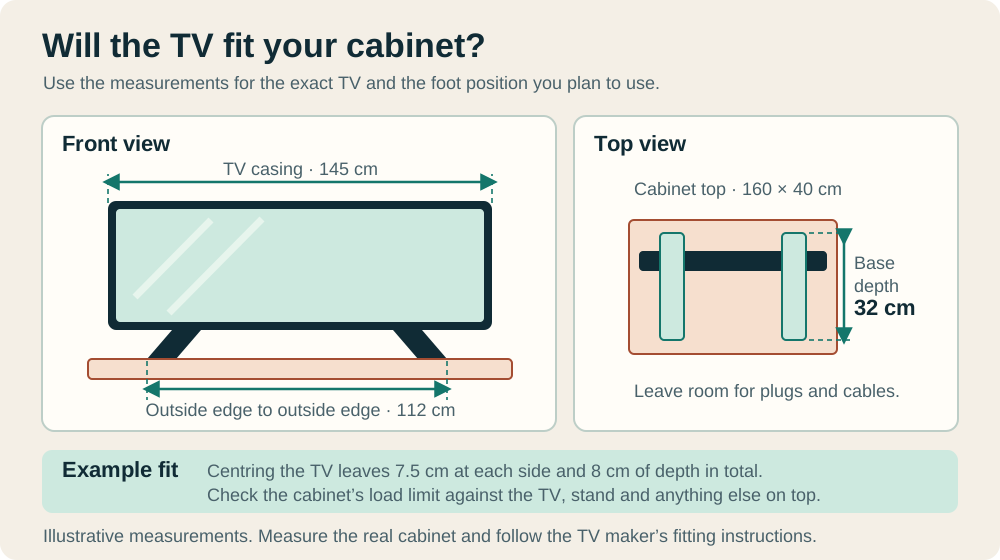
Say your TV is 145 cm wide, the feet are 112 cm apart from outside edge to outside edge, and the stand is 32 cm deep. On a flat cabinet top that's 160 cm wide and 40 cm deep, centring the TV gives you 7.5 cm of room on either side.
You have 8 cm to play with from front to back. How much of that you can use for cables depends on where the feet sit and which way the plugs point.
Draw a side view as well as a front view. Place the wall, furniture, stand and panel in it. Add the plugs using the connector locations shown in the manual.
If a rear-facing plug cannot fit without a tight bend or pressure against the wall, moving the furniture forward may be necessary.
Now imagine the cabinet is only 30 cm deep. Those 32 cm feet would stick out, even with plenty of room at the sides. You'd need a deeper cabinet or another stand approved for your TV.
Check the correct load limit
Look for the load rating of the particular top panel supporting the television. A shelf rating, drawer rating or total storage capacity is not interchangeable with it.
Include the stand in the TV weight, then account for other items on that same surface according to the furniture instructions.
For example, a hypothetical 24kg TV and stand plus a 4kg soundbar total 28kg before adding anything else. If the relevant top is rated for 25kg, the arrangement exceeds it even though the television alone is lighter.
If the rating is 30kg, the arithmetic passes, but dimensions, assembly and any other conditions still need checking.
IKEA's published information for one 180cm BESTÅ TV bench specifies a maximum television weight of 30kg and requires the floor-standing bench to be fixed to the wall. It also says wall-hung capacity depends on the wall material.
Those instructions belong to that product; another BESTÅ size or configuration may differ. IKEA BESTÅ bench information.
That example shows why a familiar furniture range name is not enough. Find the article number or exact configuration, especially for second-hand furniture whose original instructions may be missing.
Plan the soundbar and screen height together
A soundbar can fit across the cabinet yet block the bottom of the picture, the remote-control receiver or access to a television's controls. Measure its height against the clearance below the screen in the chosen stand position.
Include its feet if those are part of its stated dimensions.
Depth matters here too. A pedestal may occupy the same space where you intended to place the soundbar. Drawing both footprints reveals whether they can sit beside each other front to back without either item extending beyond its permitted support area.
Check the soundbar's own placement instructions, particularly for models with upward-facing speakers. A shelf above it or an overhanging television can affect the intended arrangement.
The answer may be a different location or approved mounting accessory, rather than raising the TV on improvised blocks.
Sit down and check the resulting picture position. Measure the furniture height plus the stand's lift to the screen's lower edge. A cabinet that was comfortable with a smaller television can place the centre of a larger picture noticeably higher.
A paper outline is an inexpensive way to assess that before delivery.
Allow for cables and routine access
List what needs connecting: power, aerial, console, streaming device, soundbar and any wired network connection. Identify whether sockets face backwards, sideways or downwards.
Their direction affects both clearance and whether you can reach them once the television is installed.
Leave cables enough freedom for the permitted movement of the television or furniture. Avoid routing them where drawers can trap them or where a person passing the cabinet can catch them. Secure the route without pulling on the sockets.
If the console or receiver lives inside the cabinet, follow that equipment's ventilation requirements. A large empty-looking compartment is not proof that a device can operate behind a closed door.
The shared living room console guide covers the equipment side of that plan.
Think about the next change as well as initial setup. If reaching one HDMI socket requires moving a heavy television every time, a different cabinet position or an accessible cable route may be worthwhile.
Plan the connection work while the installation instructions and dimensions are in front of you.
Stability and anchoring belong in the fit check
Follow both the furniture and television instructions for preventing tipping and for any anchoring required. A furniture fixing and a television restraint may serve different purposes; one does not automatically replace the other.
Use the specified approach and suitable fixings for the actual wall or support.
Keep appealing objects such as toys or controllers somewhere that does not encourage a child to climb towards the screen. Route loose cables so they cannot readily be pulled or caught.
These practical arrangements should be part of the room plan rather than an afterthought once everything is connected.
If you rent, check what installation is permitted before selecting a product that depends on wall fixings. Do not omit required anchoring to preserve a no-drill plan. Choose a suitable alternative arrangement or resolve the fixing requirement first.
For mounting work where the wall construction or fixing capacity is uncertain, seek an installer who can assess it. A dimension calculator can organise sizes and loads, but it cannot inspect a hidden wall or establish the condition of second-hand furniture.
What about a replacement tabletop stand?
A replacement stand can change the support footprint, but it introduces its own compatibility checks.
Confirm the exact television model, mounting-hole pattern, permitted weight, screw requirements and available height range against the stand manufacturer's instructions.
Matching the distance between mounting holes is only part of the job. The rear housing may have recesses, obstructions or connector locations that affect installation.
Screws need the specified engagement and spacers; do not assume the bolts from the old stand are suitable.
Check the replacement stand's assembled depth and base dimensions before buying. A smaller-looking central stand may be deeper than the original feet. If it offers rotation, allow space for the television's corners and cables throughout the intended movement.
Use an explicitly supported configuration and keep the original parts labelled if you retain them.
A replacement stand is a useful option when properly matched, but it should solve the measured problem rather than merely look more compact in a product photograph.
Does a 65-inch TV need a 65-inch cabinet?
No. The first measurement is a screen diagonal, while cabinet dimensions normally describe width, depth and height. Compare centimetres with centimetres using the complete TV dimensions and its instructions.
A cabinet's advertised maximum screen size is a prompt to check compatibility, not a substitute for those measurements.
Can I put a board on a smaller cabinet?
Do not assume that an added board makes the underlying furniture suitable. It can change how loads are carried, add weight and create new overhang or stability issues.
Use a support arrangement approved for the television and furniture, or replace the furniture with something suitable for the job.
What should I check on delivery day?
Confirm the model and supplied stand parts match the instructions you used. Before lifting, clear the route, prepare the required surface and follow the manufacturer's handling guidance.
Check the chosen foot position, all required fasteners and the final cable route before switching on.
Keep the specification sheet and furniture instructions with your measurements. If the finished arrangement differs from the plan, revisit the affected checks rather than assuming a small change is harmless.
A successful fit leaves the television properly supported, the picture at a useful height and the room straightforward to live with.
Keep exploring
Related gaming setup guides
 55 vs 65 vs 75-inch TVs: what fits your room?Compare the width, picture area and viewing distance of 55, 65 and 75-inch TVs, with room examples and a free TV size calculator.
 Shared living-room console setup: connections and quick changeoverPlan console ventilation, display compatibility, seating, audio and controller storage around ordinary shared-room use.PS5 or Xbox not showing 120Hz? Check your setupWork through the game, console settings, HDMI cable and screen input when 120Hz is missing on PS5 or Xbox. Includes a simple connection checklist.